Now on the App Store

Glimshelf is a comic, manga and book reader for iPhone and iPad. Connect Komga, Kavita or OPDS, open folders of CBZ, CBR, PDF and EPUB files, and keep your place wherever you read.

Free to download and readPro is $24.99 onceiOS and iPadOS 18 or later

Comics from a personal library lying on a sheet of paper: Pepper & Carrot episodes beside Blue Bolt, Planet Comics, Rangers Comics and Strange Worlds.

Illustration of comics from the library used throughout this site. Pepper & Carrot art by David Revoy, CC BY 4.0, with cover lettering added for this illustration. Blue Bolt, Planet Comics, Rangers Comics and Strange Worlds are in the public domain.

01Your library

Add as many Komga, Kavita and OPDS servers as you run, plus folders of files on your device. Library, Search and Home gather everything in one place, and every book shows where it lives.

Every server connection, server progress sync and local file is free, with no library-size limit.

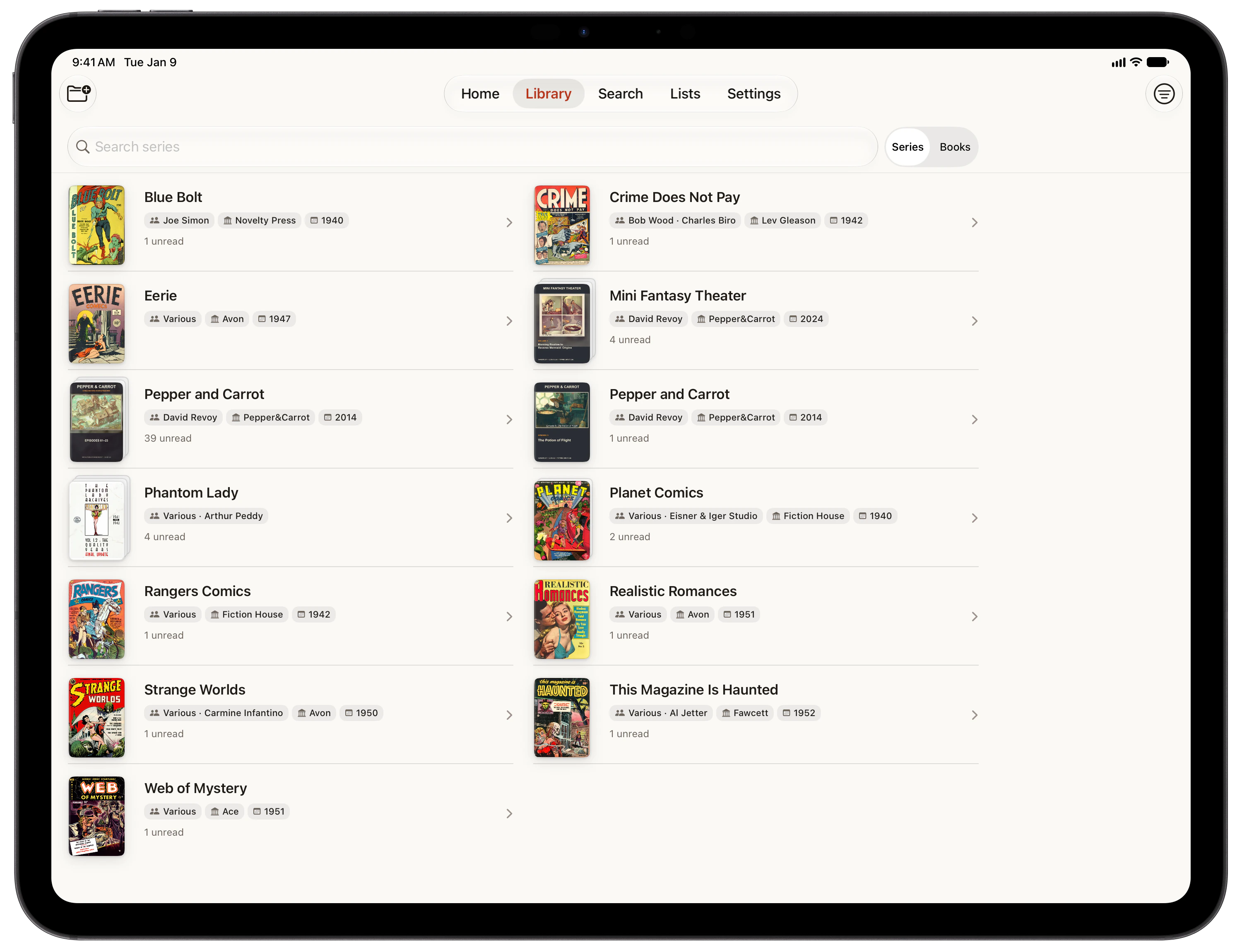
The Glimshelf Library on iPad in landscape, showing all thirteen series from a Kavita library in two columns, from Blue Bolt and Crime Does Not Pay to Web of Mystery.

The Glimshelf Library on iPad in landscape, showing all thirteen series from a Kavita library in two columns, from Blue Bolt and Crime Does Not Pay to Web of Mystery.

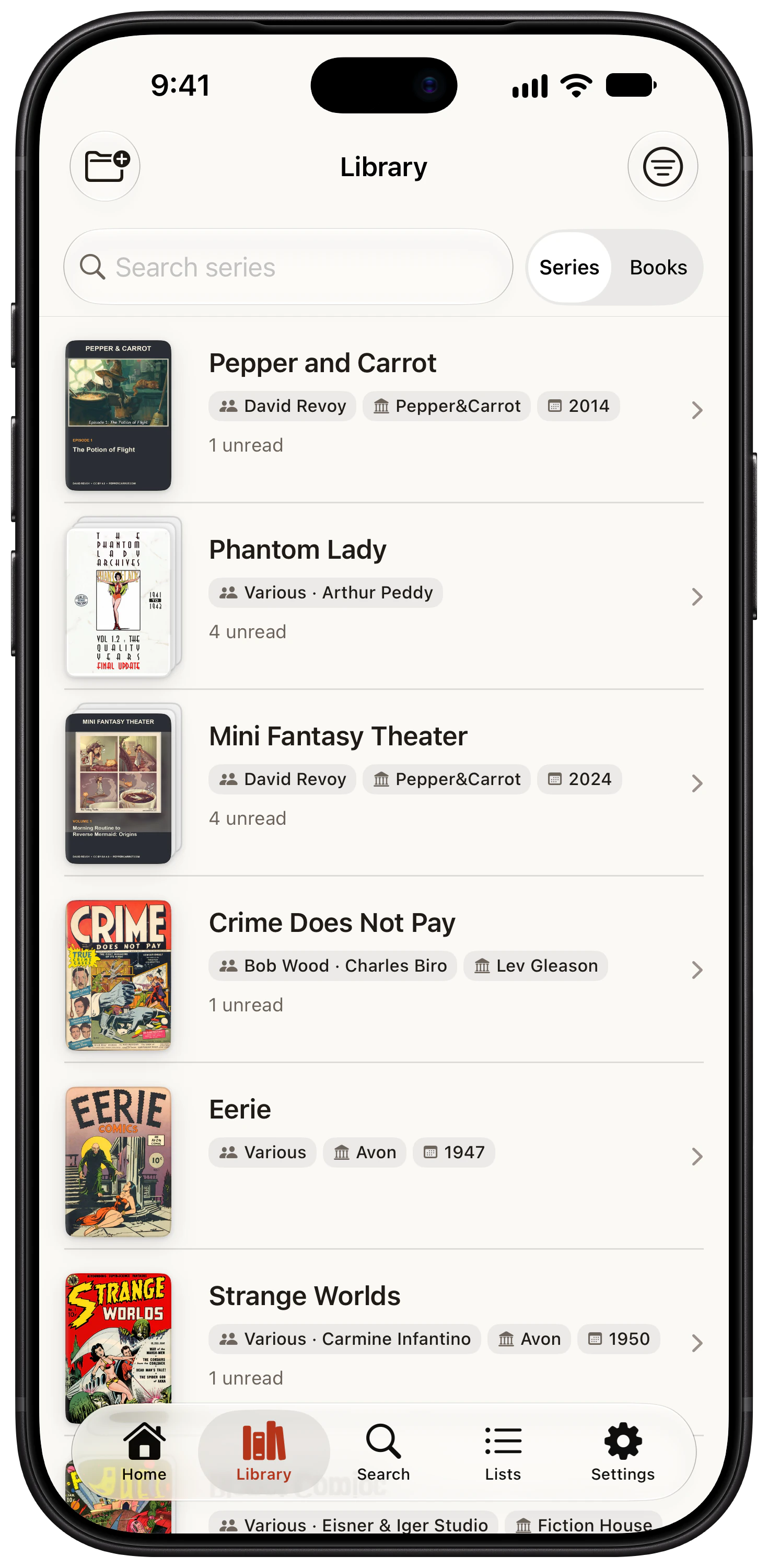
The Glimshelf Library on iPhone: Pepper and Carrot, Phantom Lady, Mini Fantasy Theater, Crime Does Not Pay, Eerie and Strange Worlds, each with creators, publisher, year and unread count.

The Glimshelf Library on iPhone: Pepper and Carrot, Phantom Lady, Mini Fantasy Theater, Crime Does Not Pay, Eerie and Strange Worlds, each with creators, publisher, year and unread count.

Covers: Pepper & Carrot by David Revoy, CC BY 4.0 · Mini Fantasy Theater by David Revoy, CC BY-SA 4.0

02The reader

Controls step aside until you need them. Turn pages left to right or right to left, scroll long strips as one canvas, and read two-page spreads on iPad and on an open iPhone Duo, with pairing you can correct when a scan is off by a page.
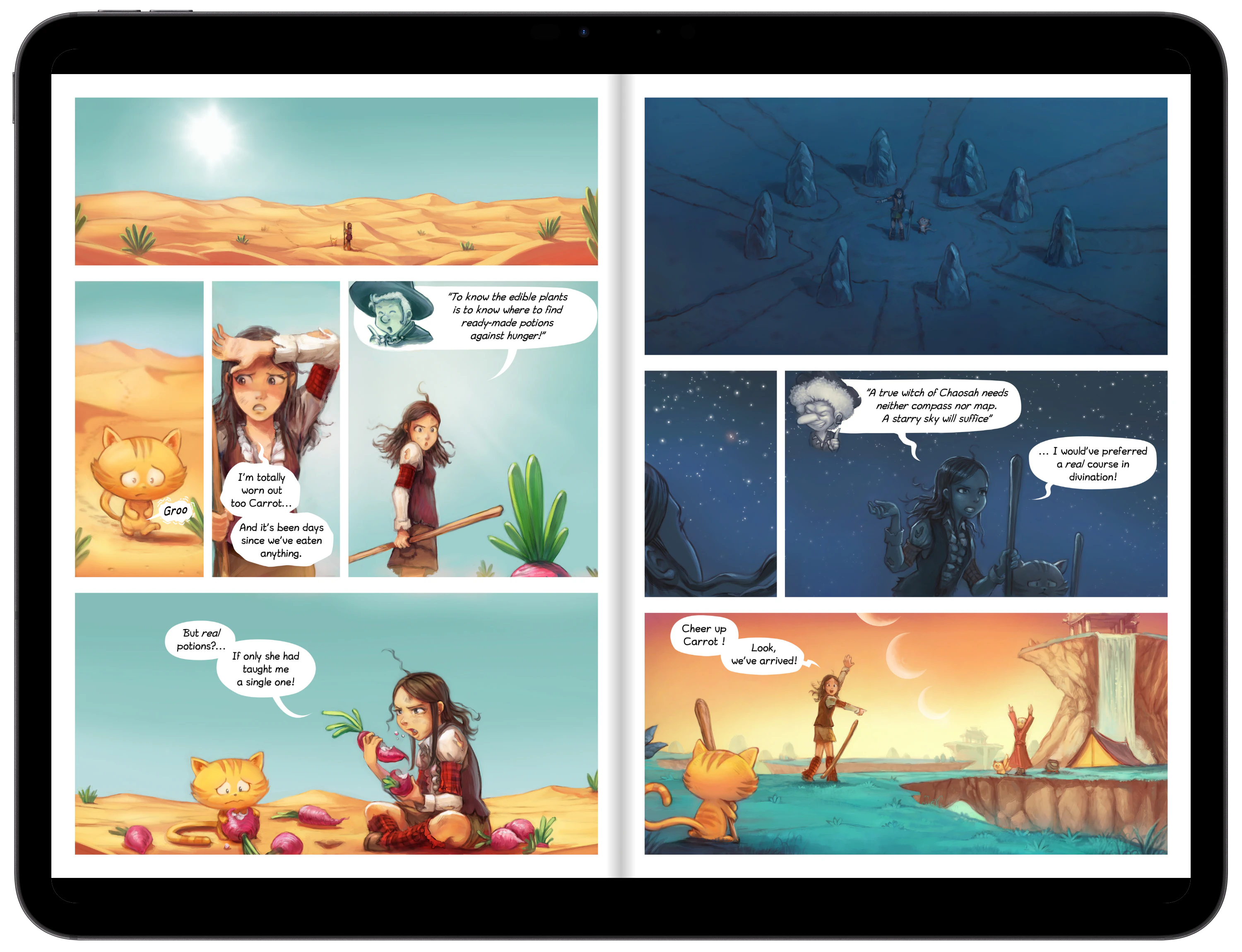
A two-page spread from Pepper and Carrot episode 17, A Fresh Start, by David Revoy, read in landscape on iPad: Pepper and Carrot cross a desert on the left page, then on the right find their way by the stars at night and arrive at camp at sunset.

A two-page spread from Pepper and Carrot episode 17, A Fresh Start, by David Revoy, read in landscape on iPad: Pepper and Carrot cross a desert on the left page, then on the right find their way by the stars at night and arrive at camp at sunset.

Double Page mode on iPad pairs facing pages, edge to edge.Art: Pepper & Carrot by David Revoy, CC BY 4.0
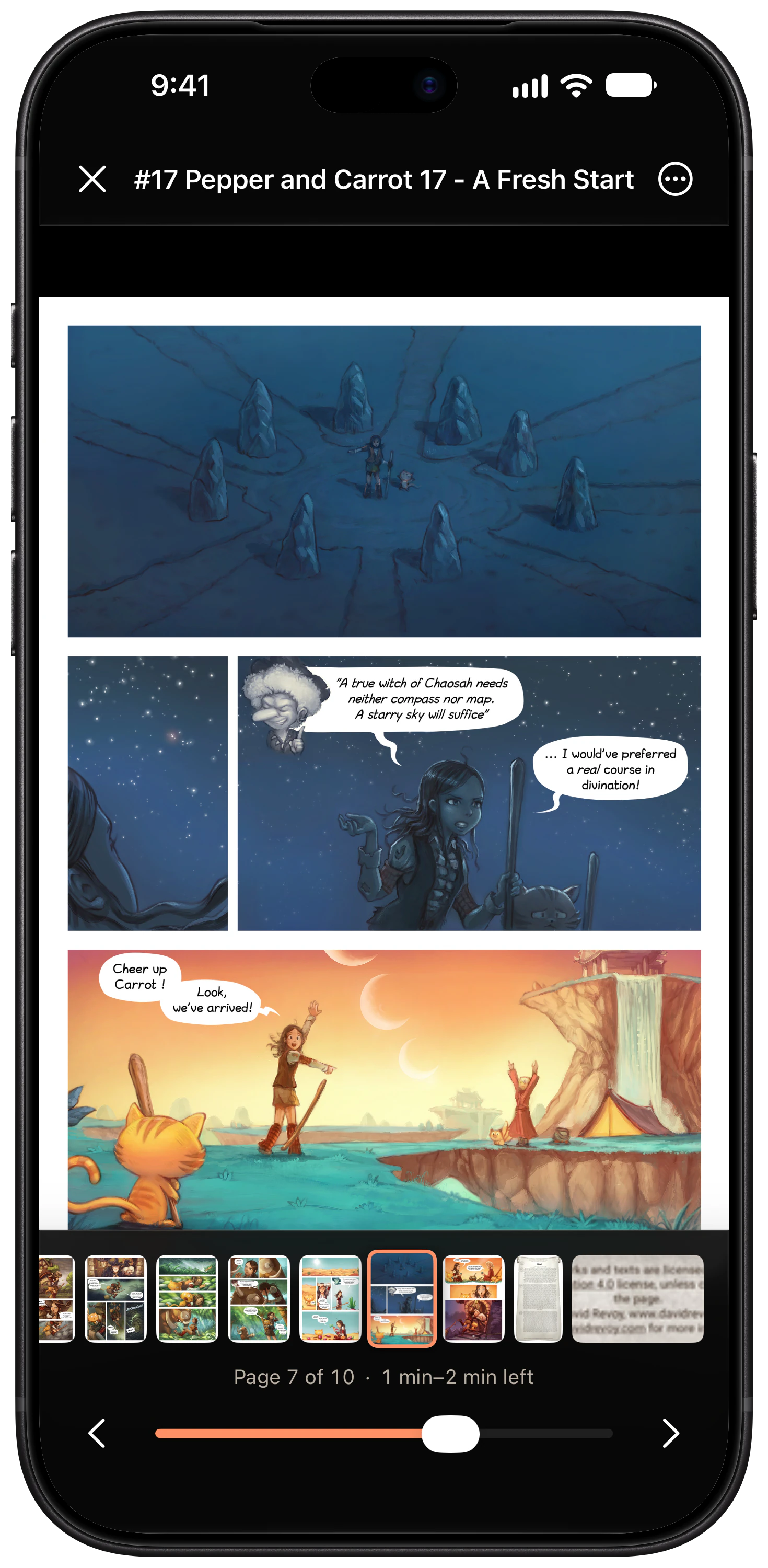
The Glimshelf reader on iPhone showing a page of Pepper and Carrot episode 17 with the filmstrip, page slider and the note Page 7 of 10, one to two minutes left.

The Glimshelf reader on iPhone showing a page of Pepper and Carrot episode 17 with the filmstrip, page slider and the note Page 7 of 10, one to two minutes left.

Paged

One page, edge to edge.

Tap the sides to turn and the middle for controls. A filmstrip and slider move you anywhere in the book, with a reading-time estimate learned from your pace.
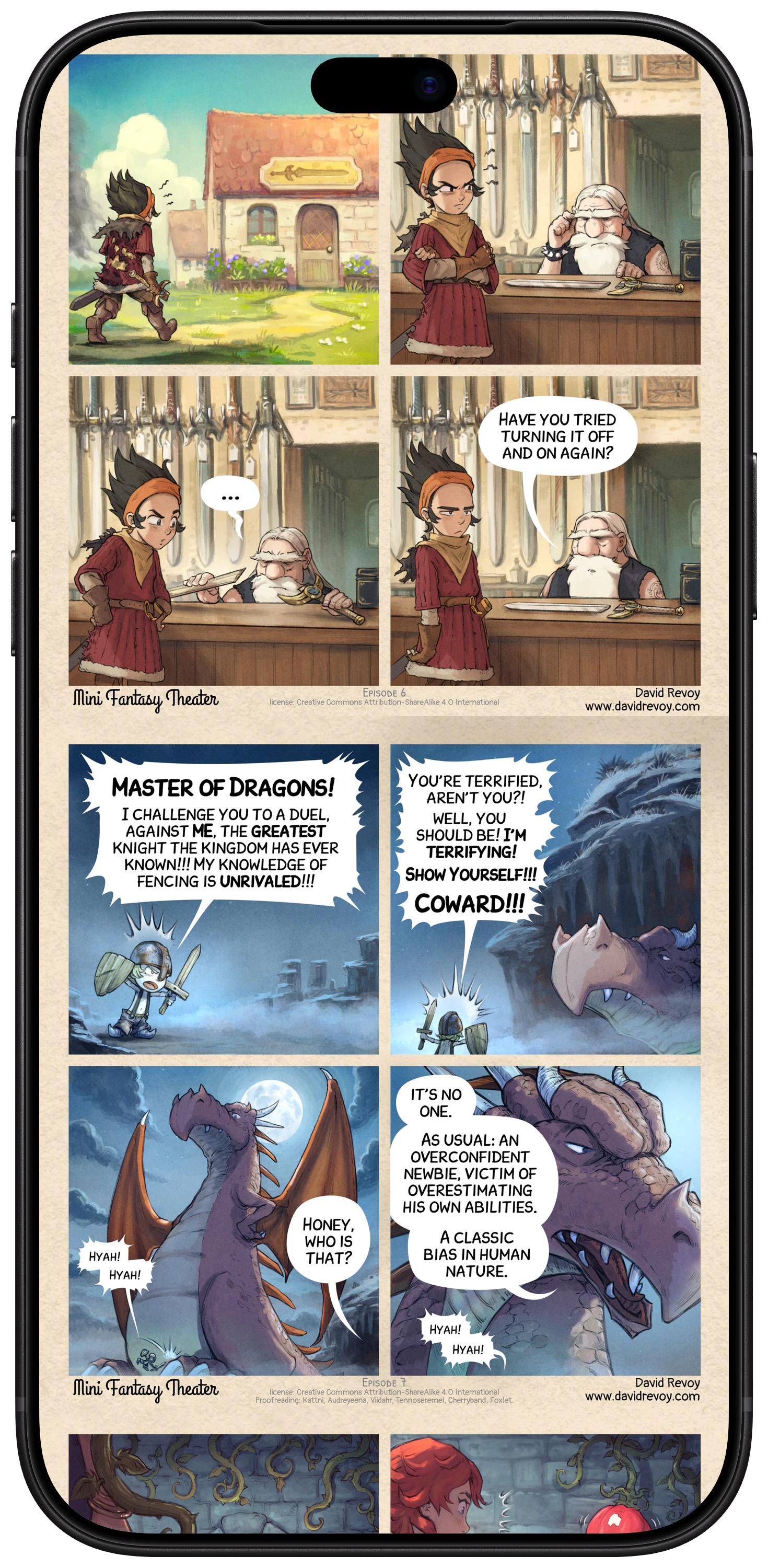
Mini Fantasy Theater strips by David Revoy stacked in one continuous vertical scroll in Glimshelf's Webtoon mode on iPhone.

Mini Fantasy Theater strips by David Revoy stacked in one continuous vertical scroll in Glimshelf's Webtoon mode on iPhone.

Webtoon

Webtoons scroll as one strip.

Vertical scrolling keeps panels flowing, with the same saved place and offline copies as paged books.
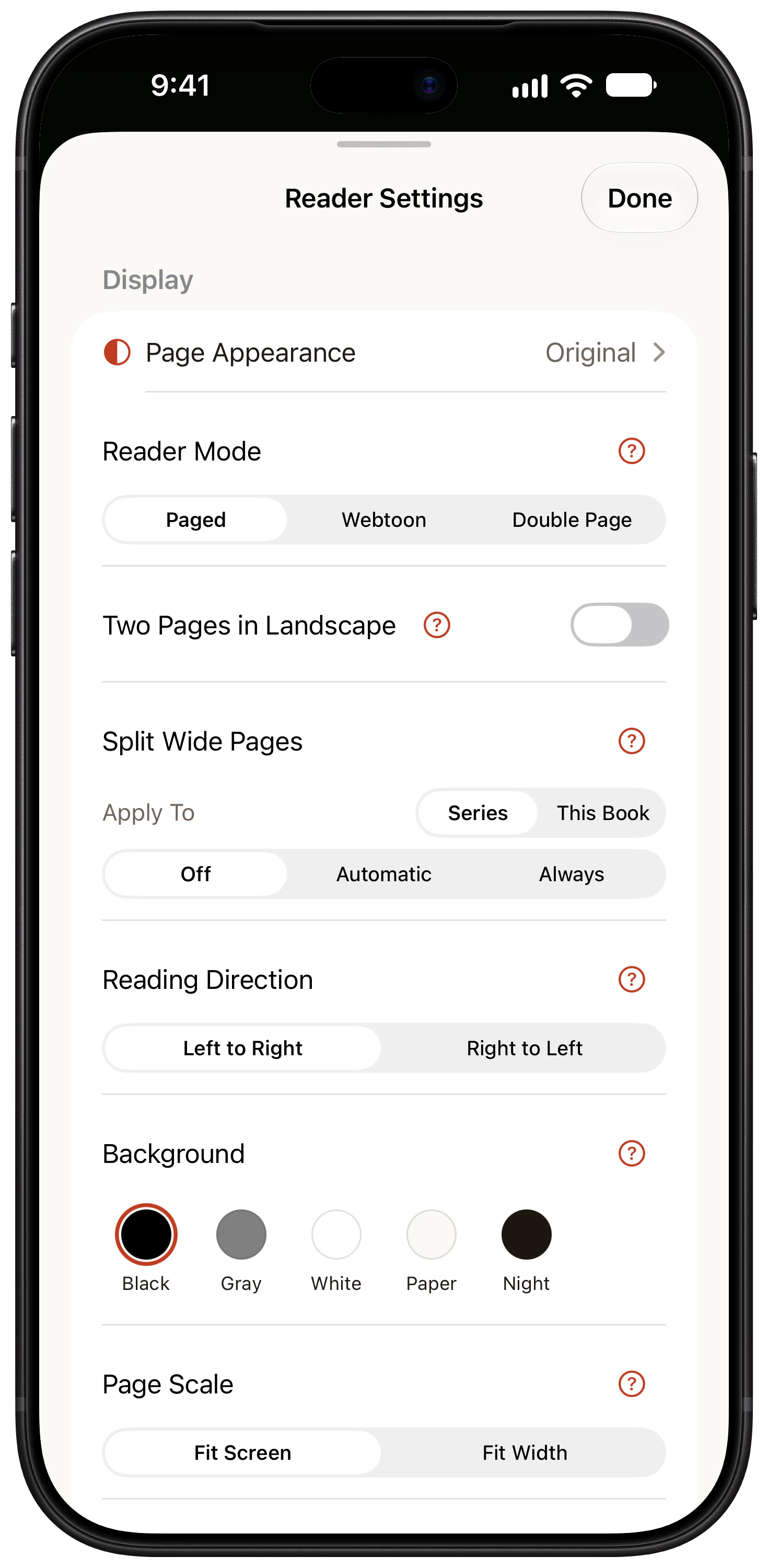
Reader Settings in Glimshelf: Page Appearance, reader mode (Paged, Webtoon or Double Page), split wide pages for the series or this book, reading direction, background (Black, Gray, White, Paper or Night) and page scale.

Reader Settings in Glimshelf: Page Appearance, reader mode (Paged, Webtoon or Double Page), split wide pages for the series or this book, reading direction, background (Black, Gray, White, Paper or Night) and page scale.

Per series

Set it once for the series.

Right to left for manga, Webtoon for long strips, a page scale that suits the art. Glimshelf remembers each choice for the series.

EPUB, reflowed

Local EPUB books reflow to the screen, with chapters, links, footnotes and text appearance you can change. Your place in each chapter is saved.

Page Appearance Pro

Crop scanner margins and restore faded or yellowed pages, for one book or a whole series.

Spreads that line up

Double Page mode pairs facing pages on iPad and iPhone Duo. When a cover or insert throws the pairing off, Fix This Spread puts it right.

Pages that curl

From version 1.0.1 a page curls under your finger as you turn it, on iPhone, iPad and iPhone Duo. In a spread the page turns over the spine. If you prefer the earlier motion, choose Slide under Page Turn in the reader's settings. With Reduce Motion on, pages change at once.
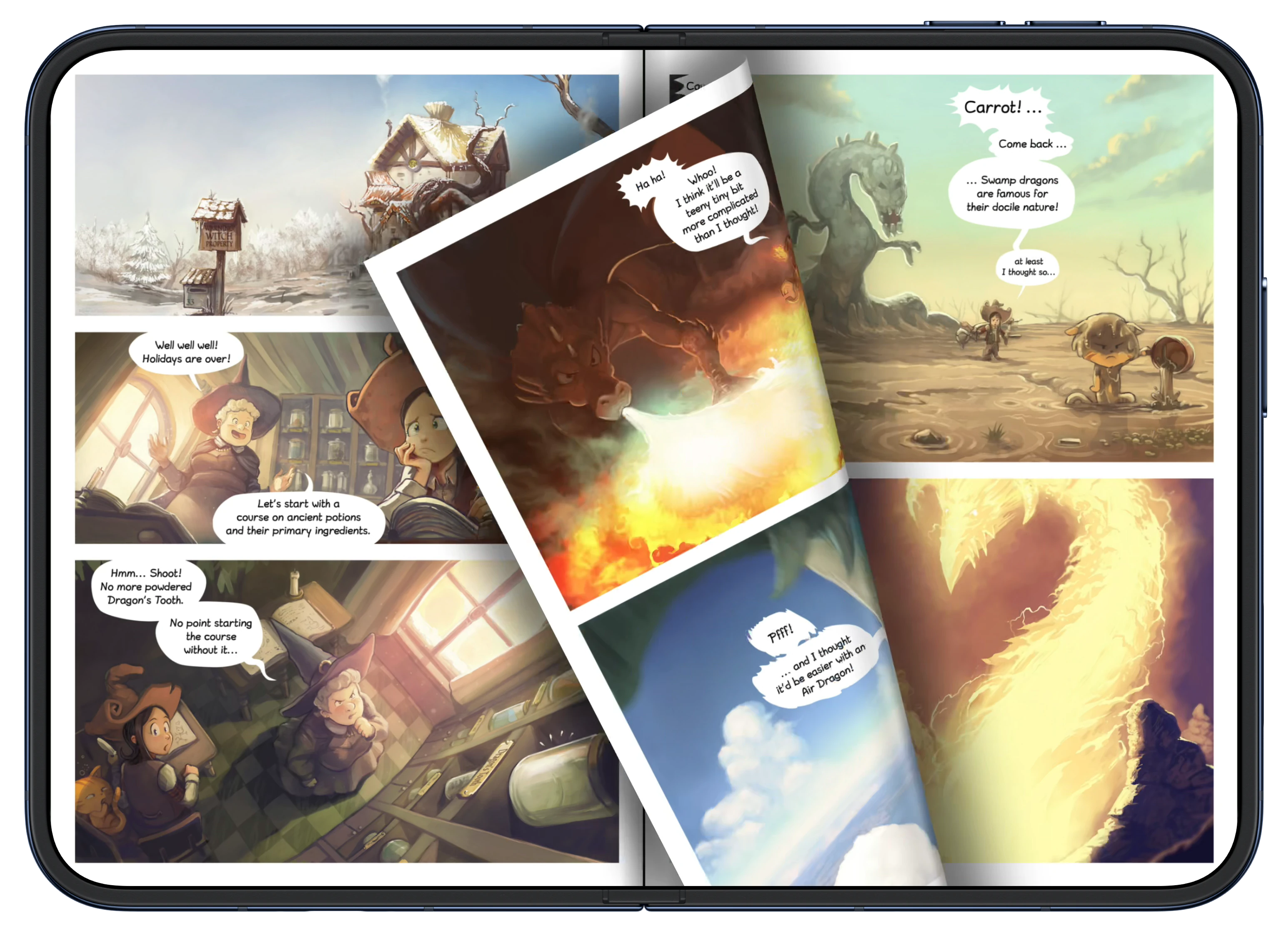
A page of a Pepper and Carrot spread lifting at its corner and curling over the spine on iPhone Duo's inner display.

A page of a Pepper and Carrot spread lifting at its corner and curling over the spine on iPhone Duo's inner display.

A page turning over the spine, recorded on iPhone Duo.Art: Pepper & Carrot by David Revoy, CC BY 4.0

Pages shown: Pepper & Carrot by David Revoy, CC BY 4.0 · Mini Fantasy Theater by David Revoy, CC BY-SA 4.0

iPhone Duo

On iPhone Duo the outer display shows a page as any iPhone does. Open the phone, hold it wide, and the same book becomes a two-page spread with its spine on the fold.

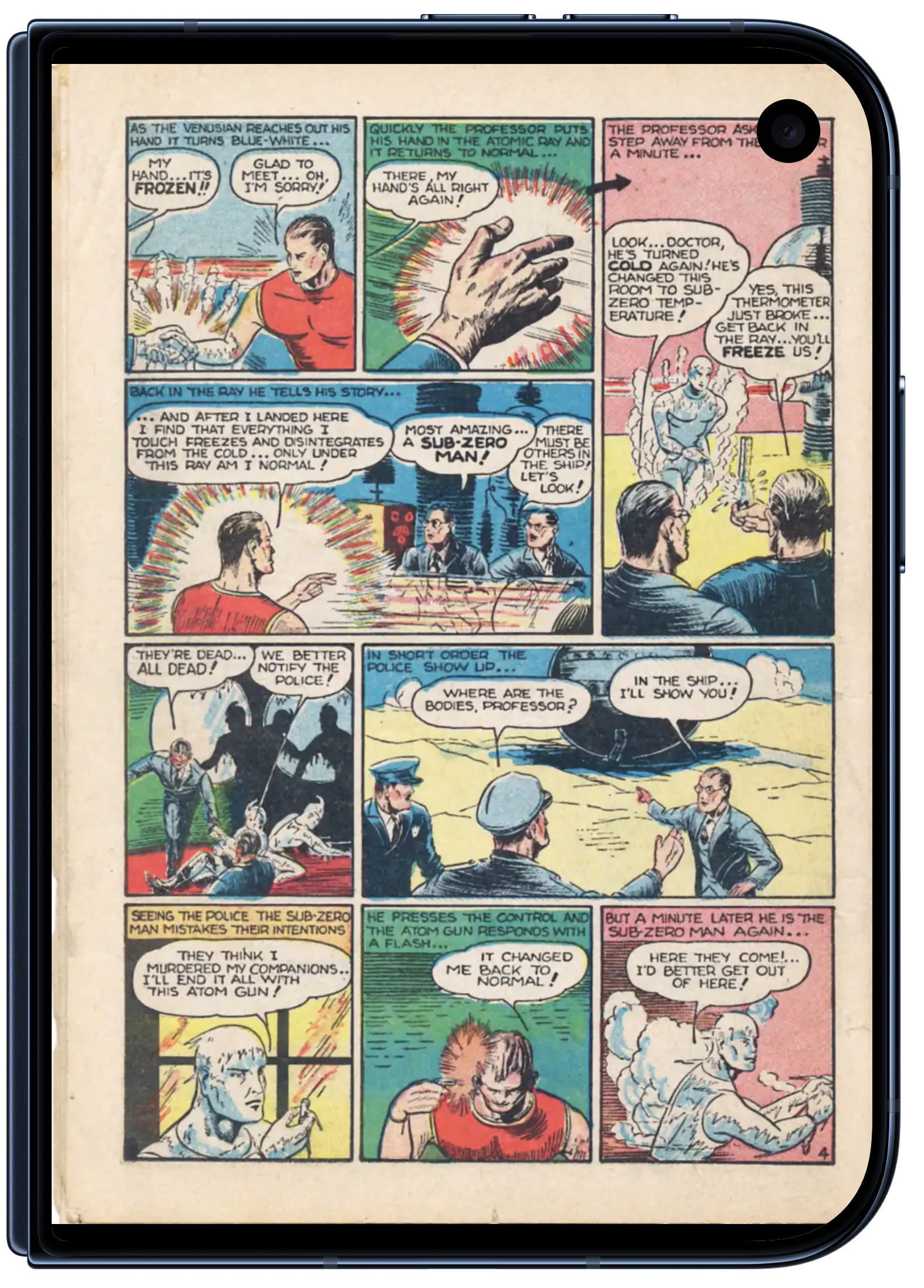
A page of a 1940 Blue Bolt comic filling iPhone Duo's outer display, with the phone closed.

A page of a 1940 Blue Bolt comic filling iPhone Duo's outer display, with the phone closed.

Closed: one page on the outer display.
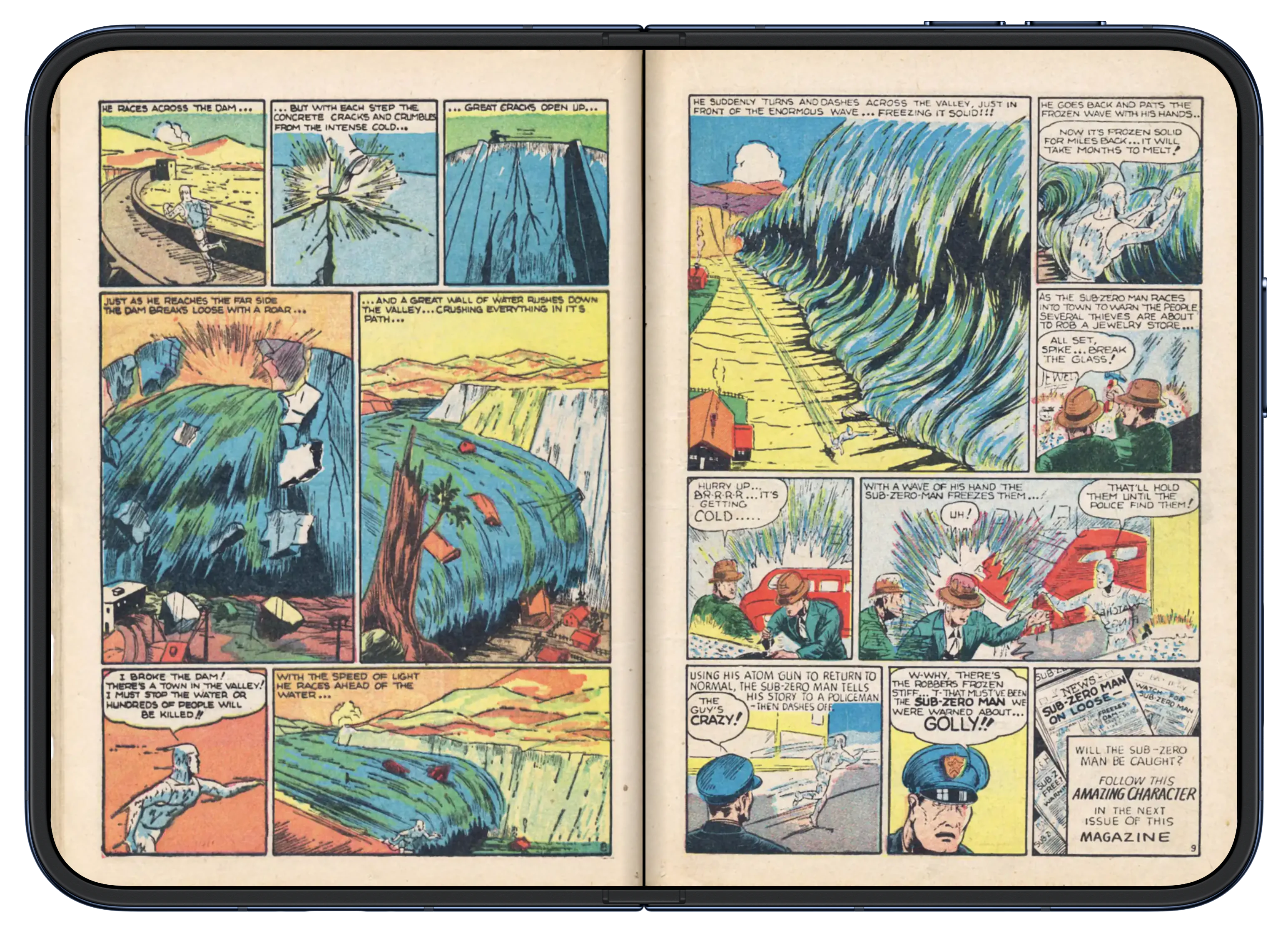
Two facing pages of a 1940 Blue Bolt comic on iPhone Duo's inner display, held wide, one page on each side of the fold.

Two facing pages of a 1940 Blue Bolt comic on iPhone Duo's inner display, held wide, one page on each side of the fold.

Open and held wide: two pages, with the spine on the fold.

The fold is the spine

Each page takes one half of the inner display, about the size it has on the closed phone. With the phone partly open, the two pages move apart so no art sits in the crease.

Fold it mid-book

Closing the phone on a spread leaves one of its two pages on the outer display. Opening it again brings the spread back. Your place is saved at the moment of the fold.
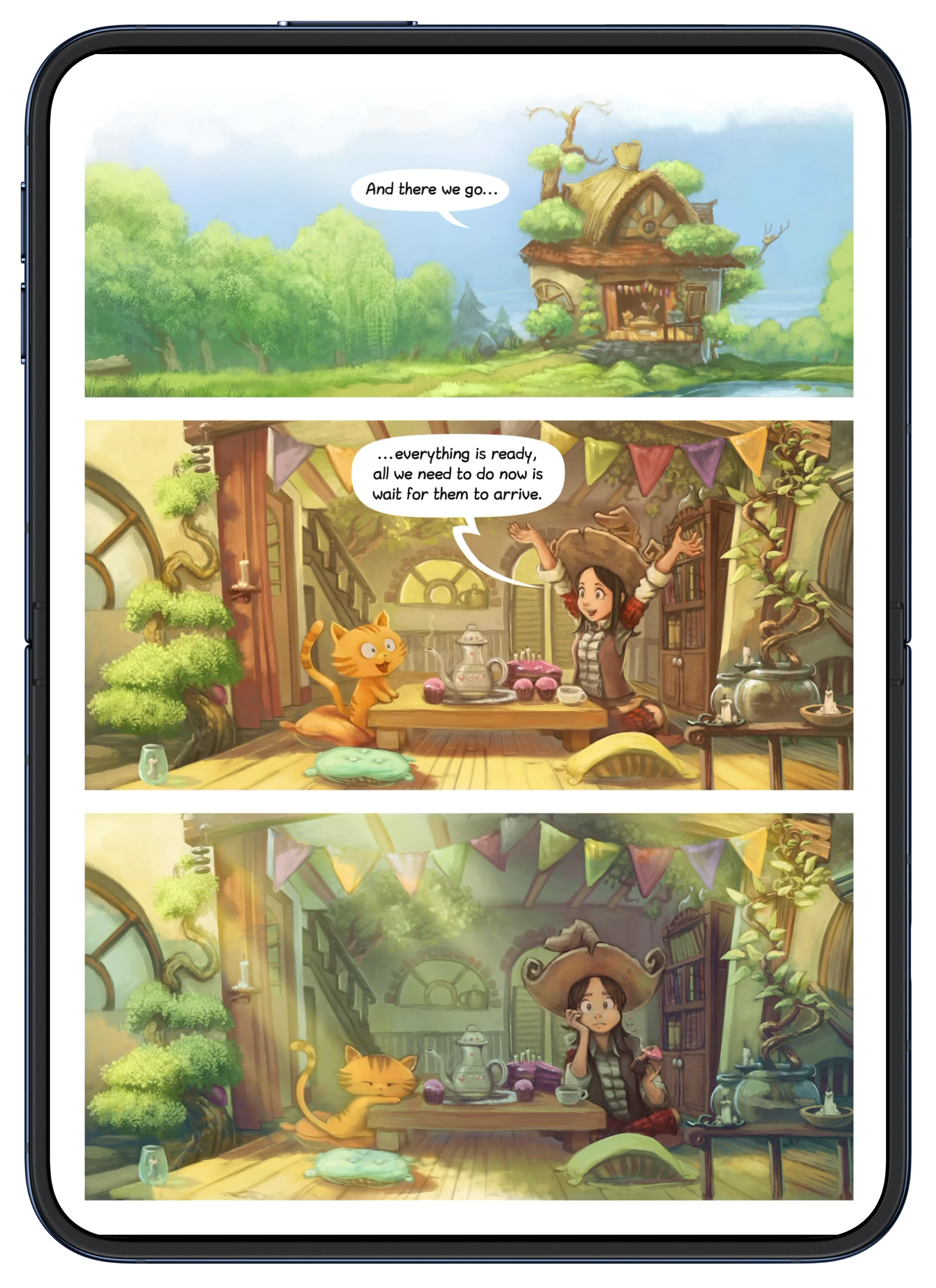
One page of a Pepper and Carrot episode filling iPhone Duo's inner display, with the open phone held upright.

One page of a Pepper and Carrot episode filling iPhone Duo's inner display, with the open phone held upright.

Held tall, one large page

With the open phone held upright, a single page fills the inner display and turns with a curl you can drag from an edge or a corner.

Glimshelf Home on iPhone Duo's inner display: Up Next, Recently Added and Continue Reading shelves of covers, one above another.

Glimshelf Home on iPhone Duo's inner display: Up Next, Recently Added and Continue Reading shelves of covers, one above another.

Home, arranged by hand

Continue Reading, Up Next and the shelves you pin have room to sit one above another. Hold a shelf and drag it to where you want it.

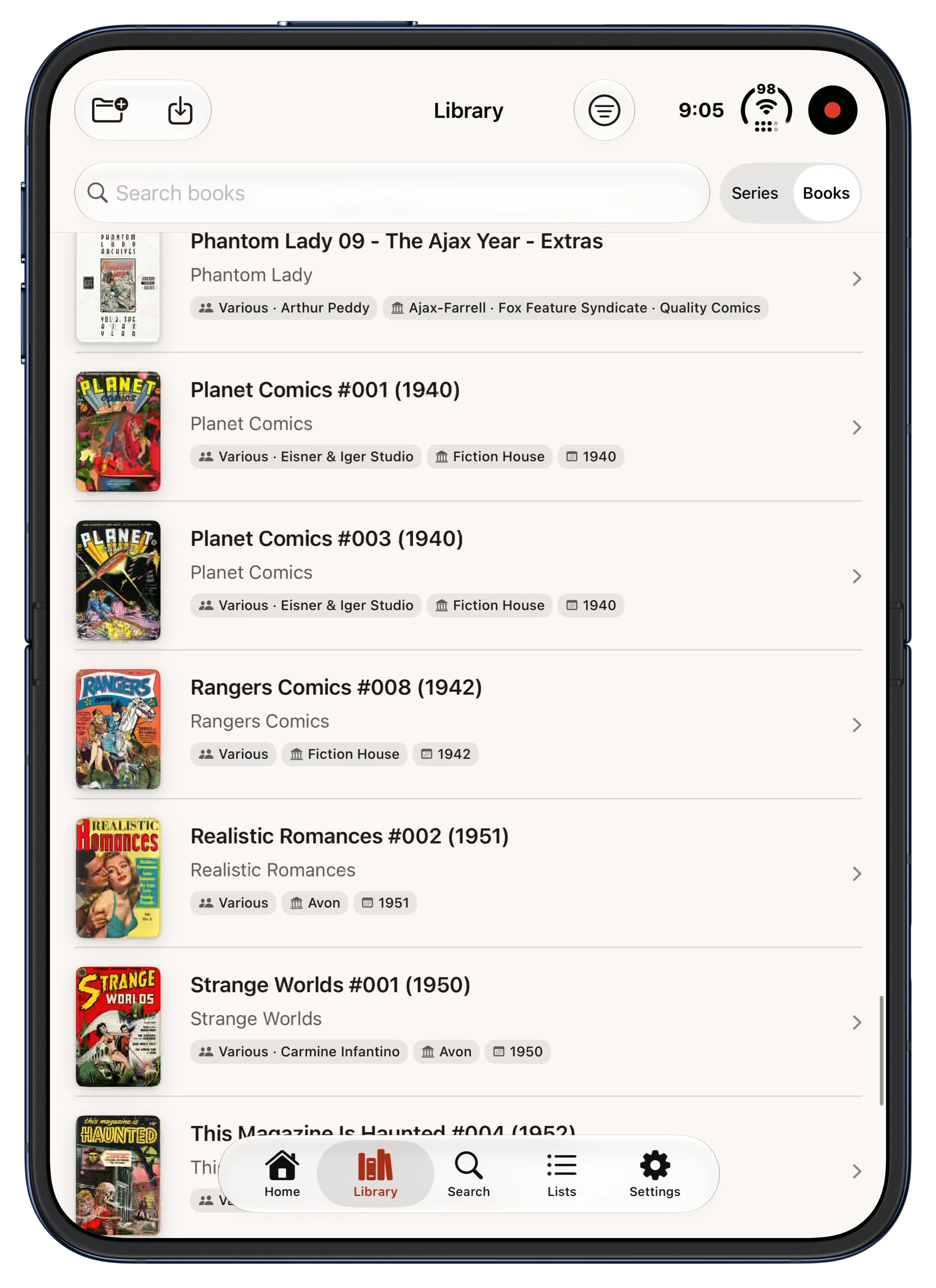
A long Library list scrolling on iPhone Duo's inner display, with a cover, title, series and publisher on each row.

A long Library list scrolling on iPhone Duo's inner display, with a cover, title, series and publisher on each row.

Smooth with thousands of books

A long list scrolls smoothly however large your library grows. With the phone open, each row has room for its cover, series and publisher.

Recorded on an iPhone Duo. Art shown: Pepper & Carrot by David Revoy, CC BY 4.0 · Mini Fantasy Theater by David Revoy, CC BY-SA 4.0

iPhone Duo support requires Glimshelf 1.0.1 or later.

Bubble Zoom Pro

Bubble Zoom finds the speech balloons on a page and steps through them, one at a time, at a size you can read. Copy a line, hear it spoken, or translate it with Apple's on-device translation.

Text recognition runs on your device and works best with horizontal lettering. Translation needs a supported device and language pair, and may download language files first.
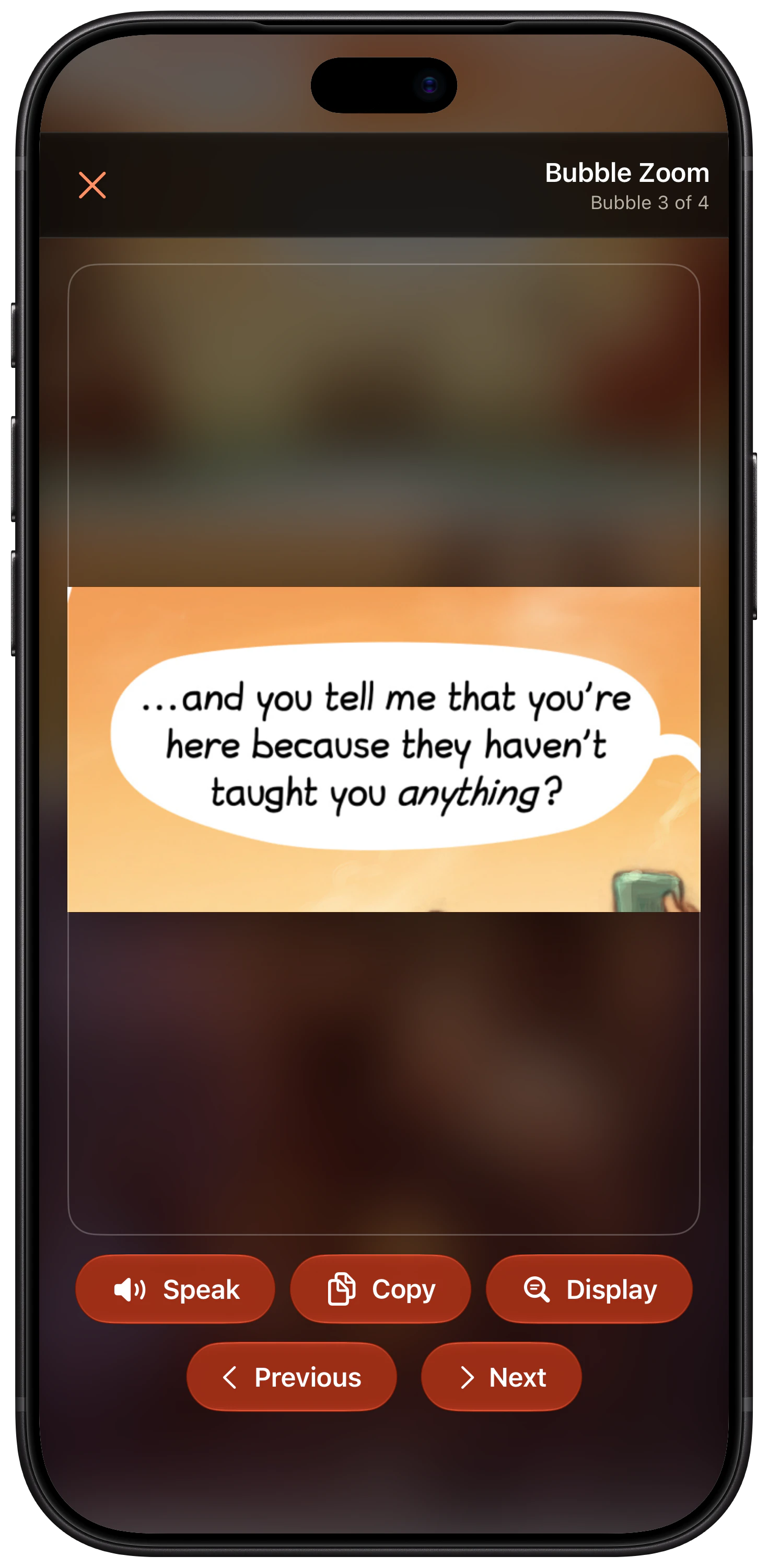
Bubble Zoom in Glimshelf showing one speech balloon from Pepper and Carrot at a large, readable size, labelled Bubble 3 of 4, with Speak, Copy, Display, Previous and Next buttons.

Bubble Zoom in Glimshelf showing one speech balloon from Pepper and Carrot at a large, readable size, labelled Bubble 3 of 4, with Speak, Copy, Display, Previous and Next buttons.

Bubble Zoom steps through the balloons on a page, one at a time.Art: Pepper & Carrot by David Revoy, CC BY 4.0

03Home

Reading Now opens the book you were in, at the page you left. Up Next follows the series or reading list you are working through. Press and hold a shelf title to move it, and keep only the shelves you use.
  • Continue Reading across every server and folder.
  • Pin a reading list to Home, or a Reading Order or Smart Collection with Pro.
  • Rediscover shelves suggest what to finish and what to read next. Pro
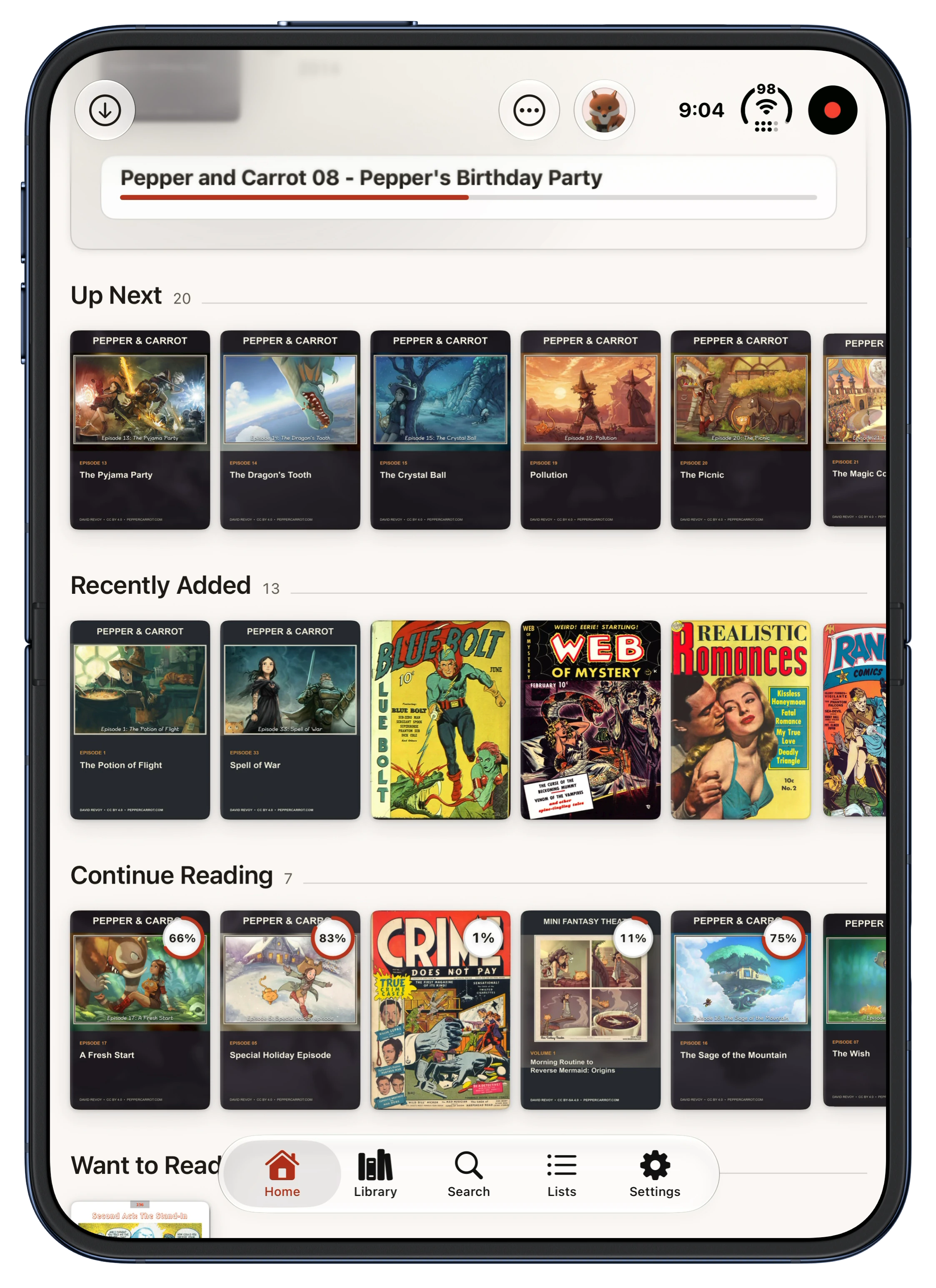
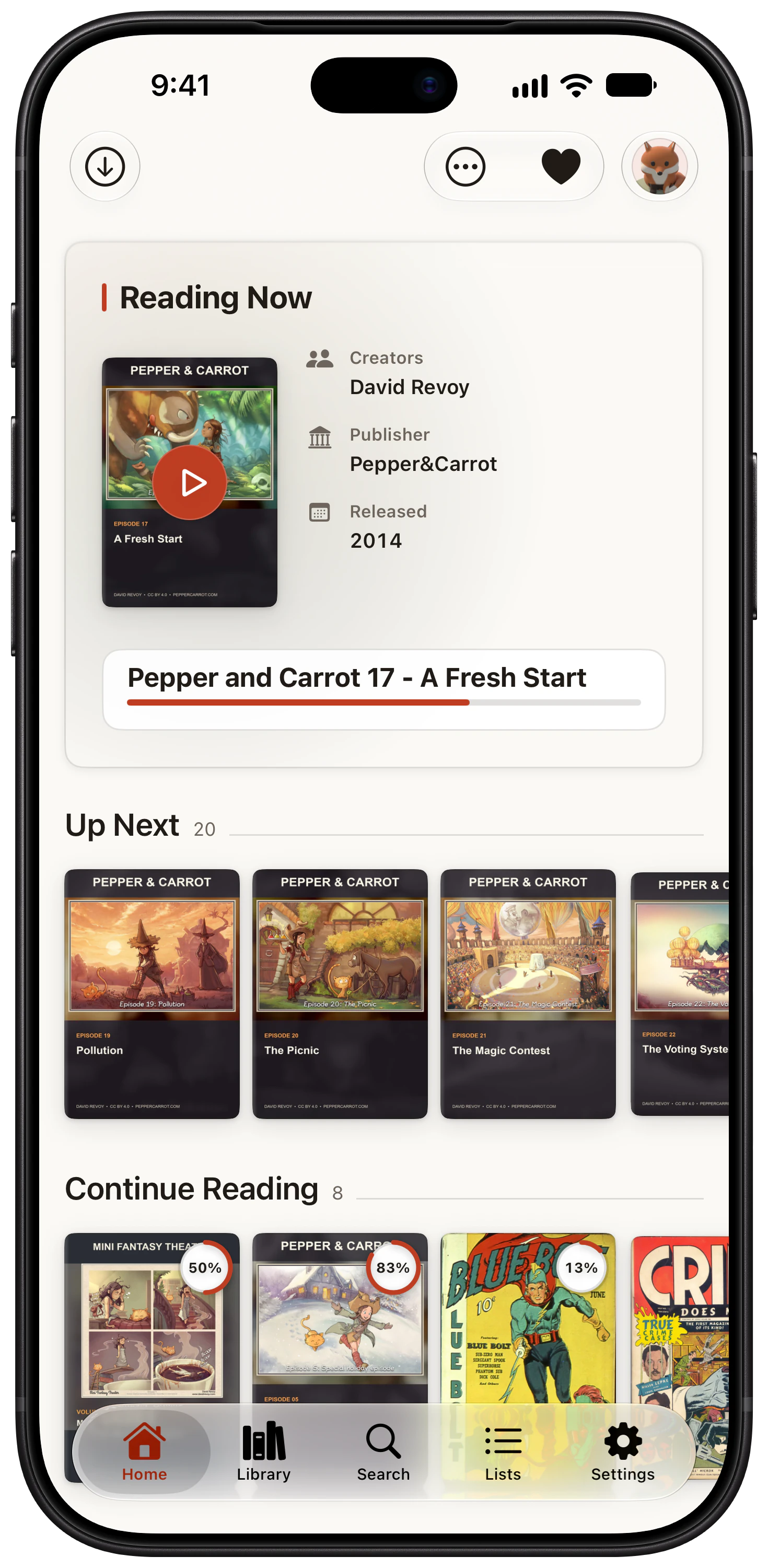
Glimshelf Home on iPhone. Reading Now shows Pepper and Carrot episode 17, A Fresh Start, by David Revoy, about two thirds read. Up Next lists the following episodes and Continue Reading shows Mini Fantasy Theater, Pepper and Carrot, Blue Bolt and other books in progress.

Glimshelf Home on iPhone. Reading Now shows Pepper and Carrot episode 17, A Fresh Start, by David Revoy, about two thirds read. Up Next lists the following episodes and Continue Reading shows Mini Fantasy Theater, Pepper and Carrot, Blue Bolt and other books in progress.

Home opens on the book you were reading, then the next ones in the series.
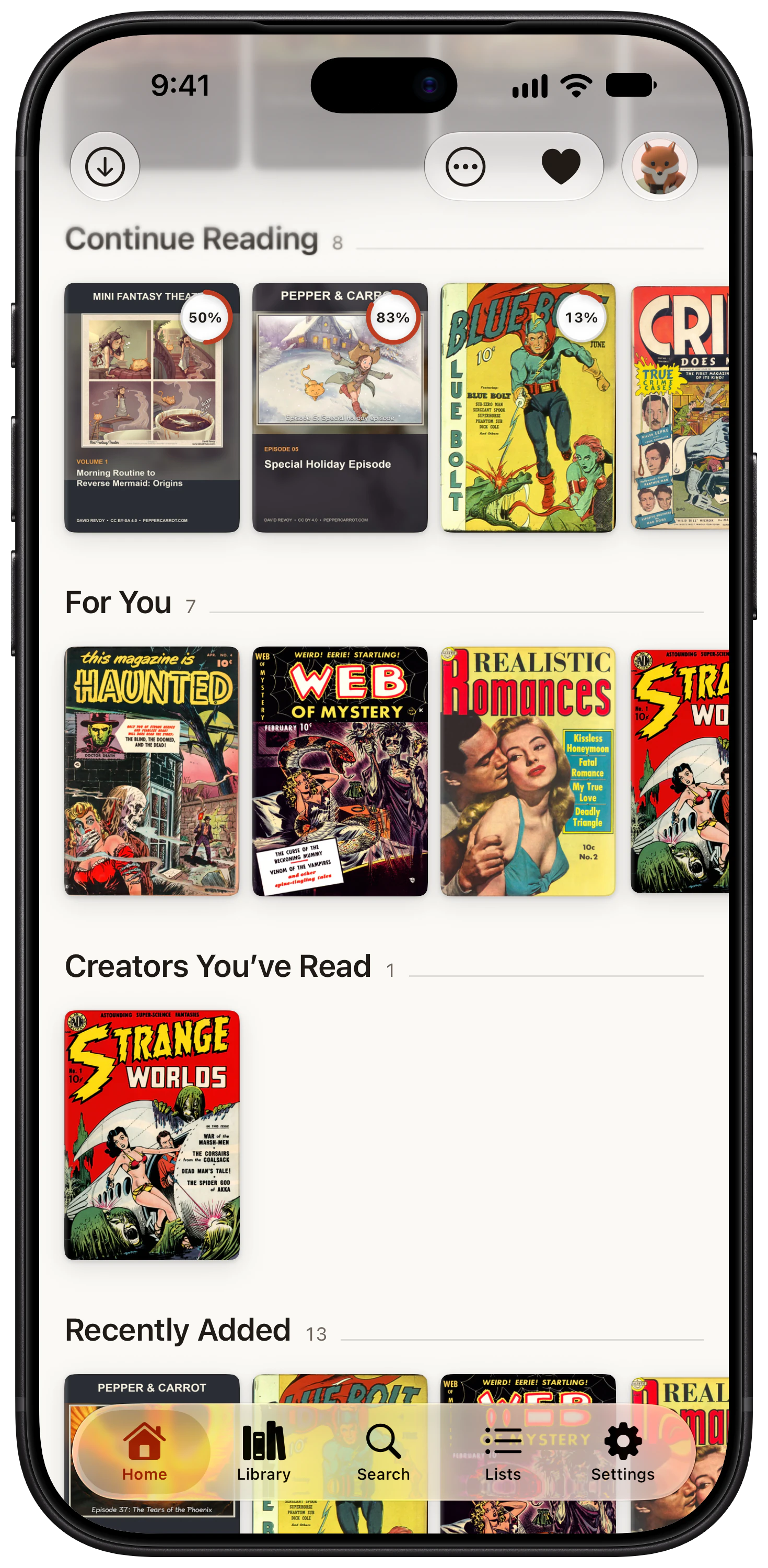
Further down Home in Glimshelf: Continue Reading, For You with This Magazine Is Haunted, Web of Mystery and Realistic Romances, Creators You've Read with Strange Worlds, and Recently Added.

Further down Home in Glimshelf: Continue Reading, For You with This Magazine Is Haunted, Web of Mystery and Realistic Romances, Creators You've Read with Strange Worlds, and Recently Added.

Rediscover shelves suggest what to read next.

Art: Pepper & Carrot by David Revoy, CC BY 4.0 · Mini Fantasy Theater by David Revoy, CC BY-SA 4.0

04Offline

Download a book, a series or a Trip Pack for the weekend. Glimshelf checks that every file is ready before you leave, saves your progress on the device while you read, and syncs it when your server is back.

  • Every book downloadedWeekend Magic
  • Every file verifiedOpens offline
  • Progress saved on this deviceSyncs later
  • Ready for Airplane Mode

If this device and your server both moved on since the last sync, Glimshelf shows you both pages and asks which to keep.

Free keeps 5 server books downloaded at a time, including Trip Packs; local files never count. Pro removes the limit and adds automatic downloading of the next issue.

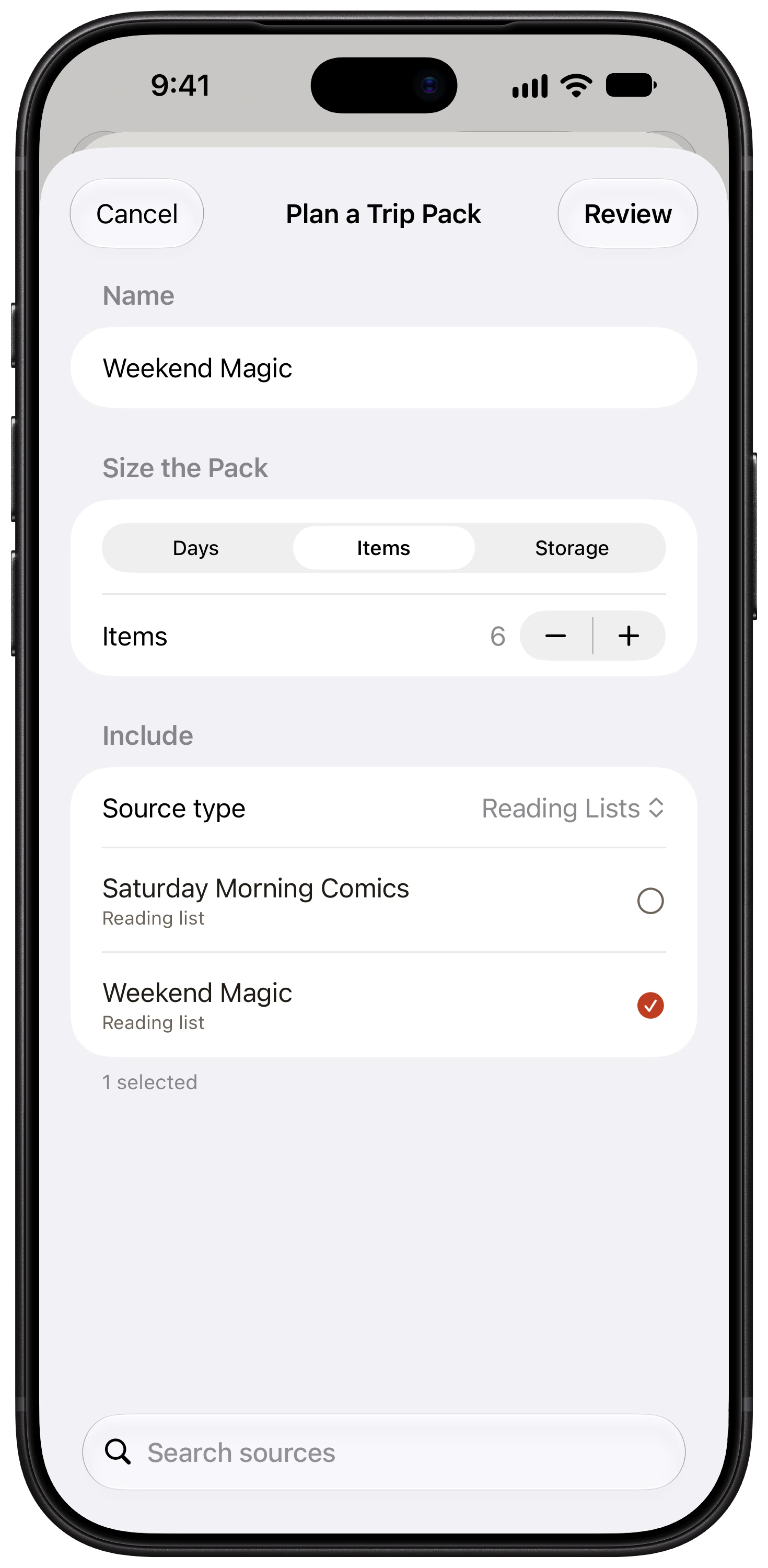
Planning a Trip Pack named Weekend Magic in Glimshelf: sized by days, items or storage, set to six items, with the Weekend Magic reading list selected.

Planning a Trip Pack named Weekend Magic in Glimshelf: sized by days, items or storage, set to six items, with the Weekend Magic reading list selected.

Size a Trip Pack by days, items or storage, then choose what goes in it.
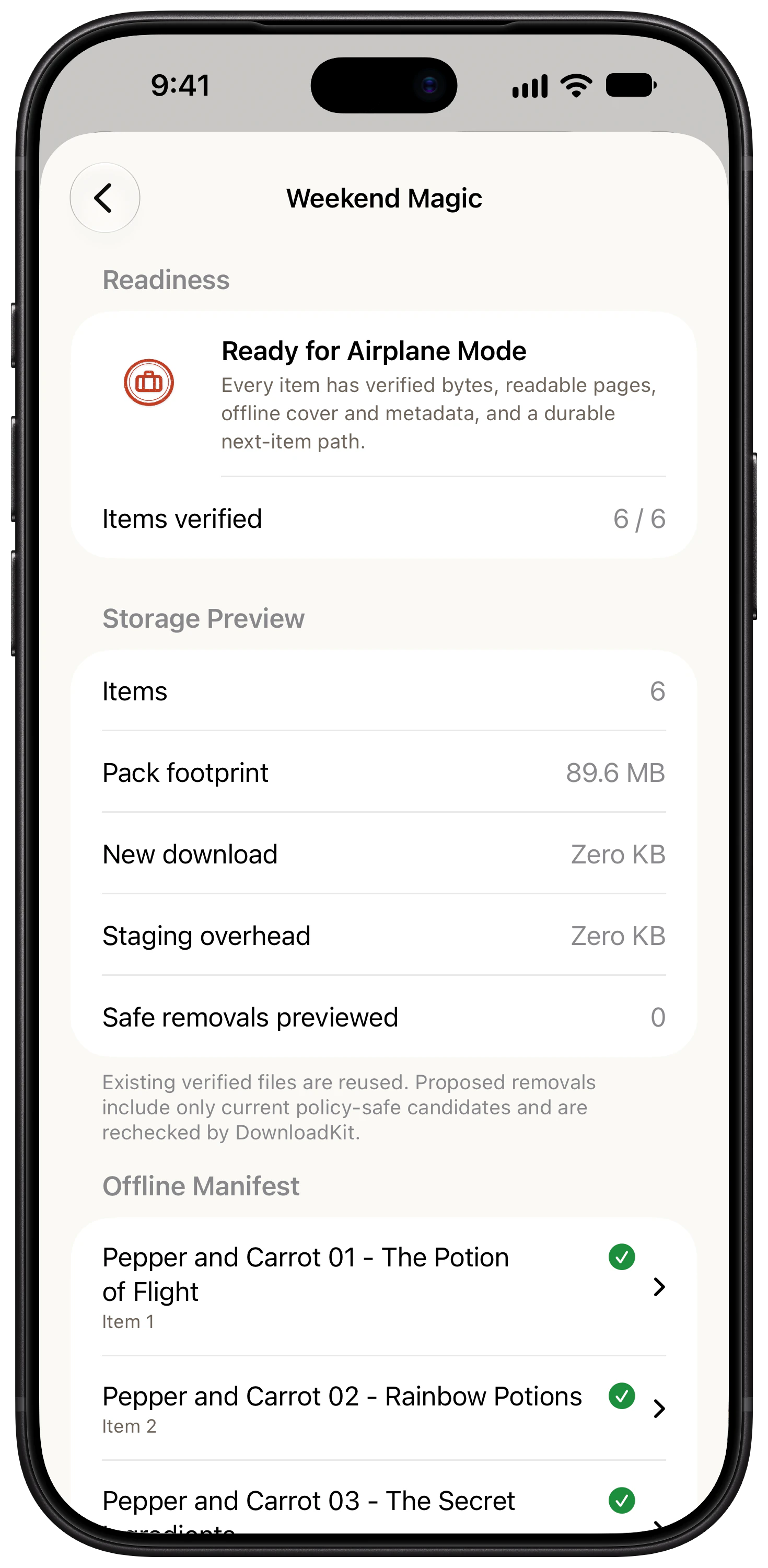
The Weekend Magic Trip Pack in Glimshelf marked Ready for Airplane Mode, with six of six items verified, an 89.6 MB footprint and the first episodes of Pepper and Carrot checked off.

The Weekend Magic Trip Pack in Glimshelf marked Ready for Airplane Mode, with six of six items verified, an 89.6 MB footprint and the first episodes of Pepper and Carrot checked off.

Ready for Airplane Mode means every file was downloaded and verified.

05Reading Orders

Import a Comic Book List or build an order across series, then pick up at the next unread step. Titles missing from your library stay listed, so you know exactly what you are skipping. Pro
  • CBL import and export, with a review of any title it could not match.
  • Reading lists from Kavita and Komga keep their order, on Free too.
  • Bookmarks and notes gather in one place, synced through your private iCloud. Pro
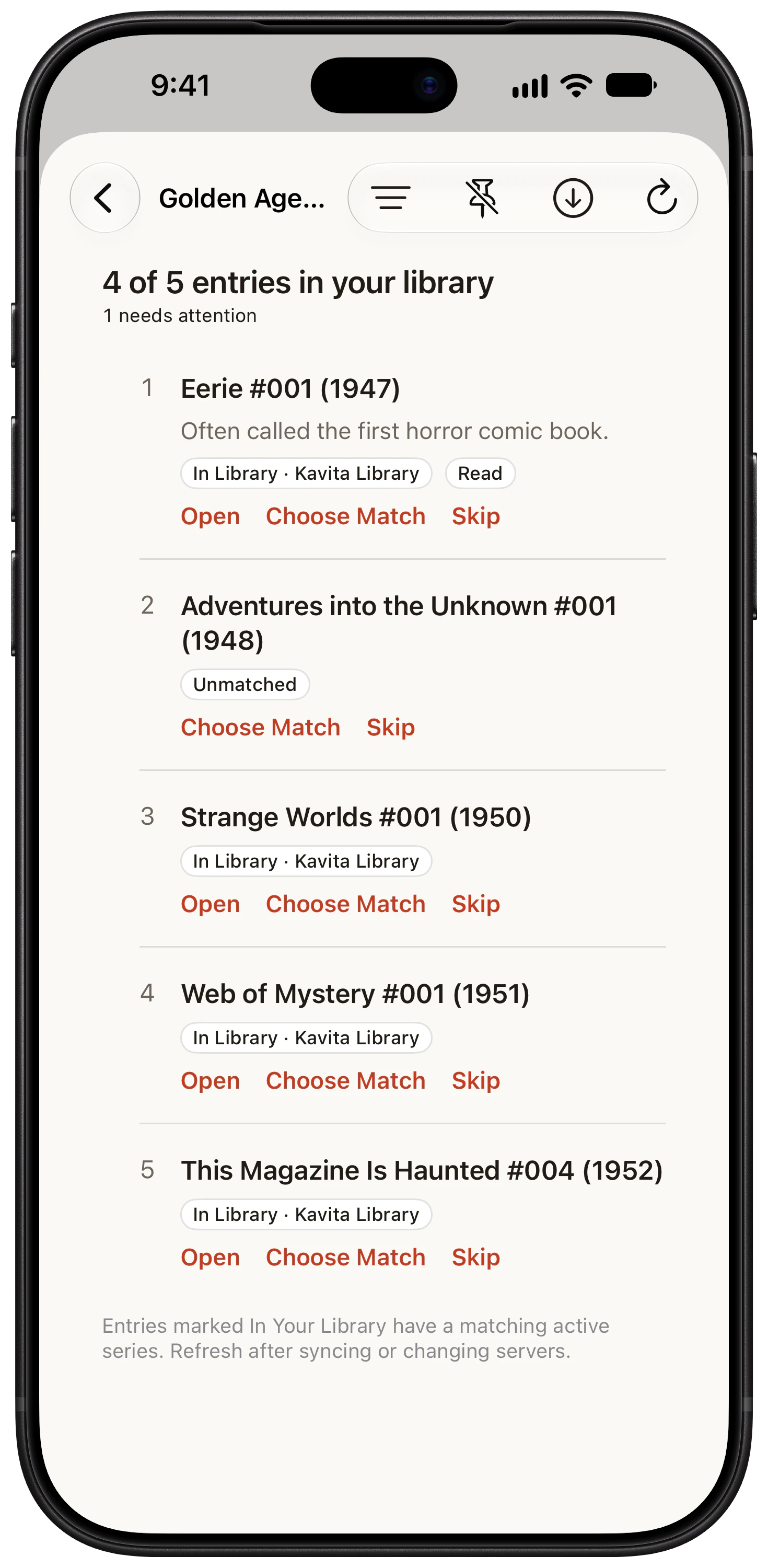
A custom Golden Age Horror reading order in Glimshelf: four of five entries in the library, from Eerie #001 (1947) to This Magazine Is Haunted #004 (1952), with Adventures into the Unknown #001 listed as unmatched.

A custom Golden Age Horror reading order in Glimshelf: four of five entries in the library, from Eerie #001 (1947) to This Magazine Is Haunted #004 (1952), with Adventures into the Unknown #001 listed as unmatched.

A reading order across series. Missing titles stay in the list.
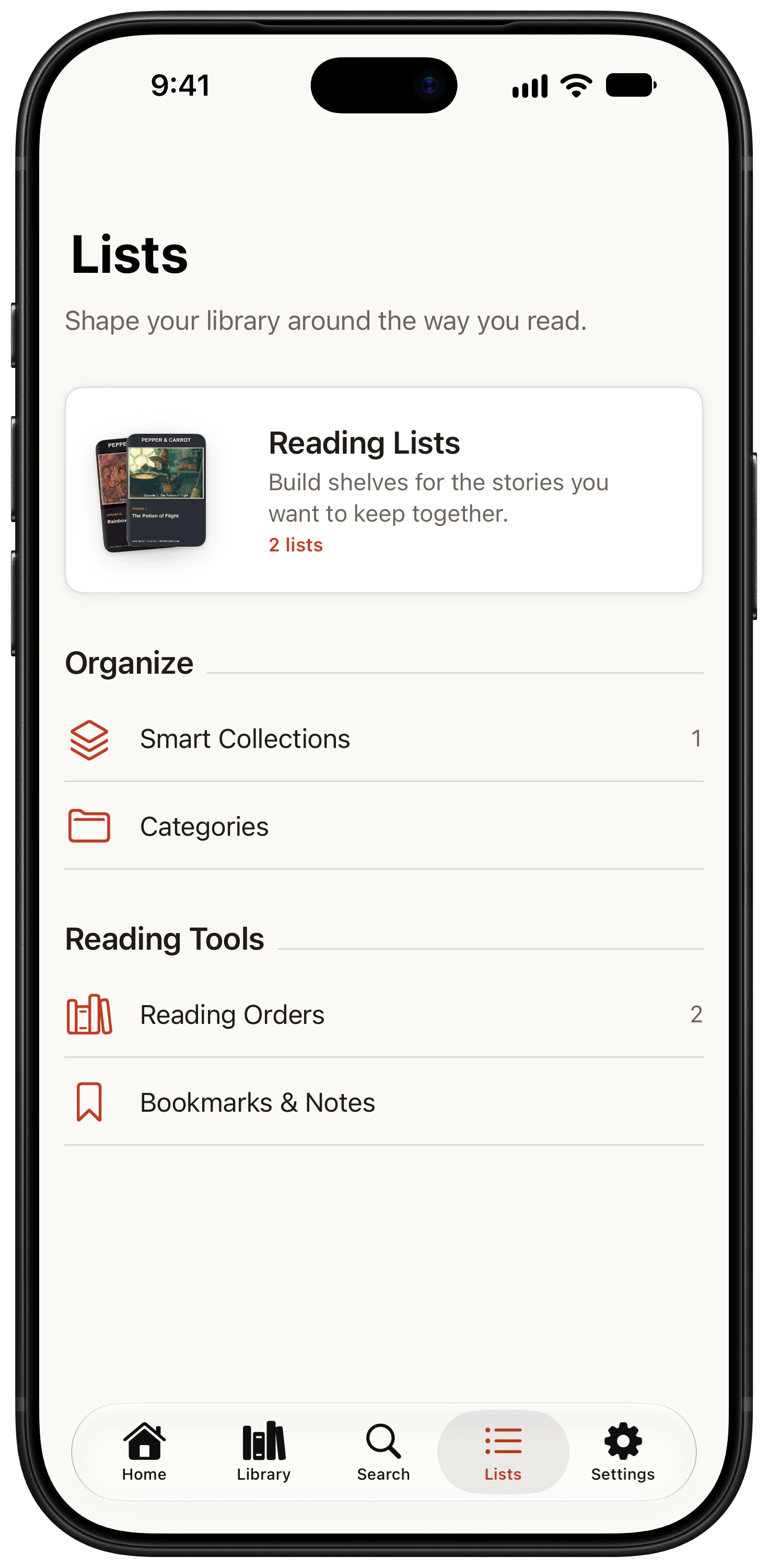
The Lists tab in Glimshelf with Reading Lists, Smart Collections, Categories, Reading Orders, and Bookmarks and Notes.

The Lists tab in Glimshelf with Reading Lists, Smart Collections, Categories, Reading Orders, and Bookmarks and Notes.

Reading lists, Smart Collections and Reading Orders live together in Lists.

Art: Pepper & Carrot by David Revoy, CC BY 4.0

06When something breaks

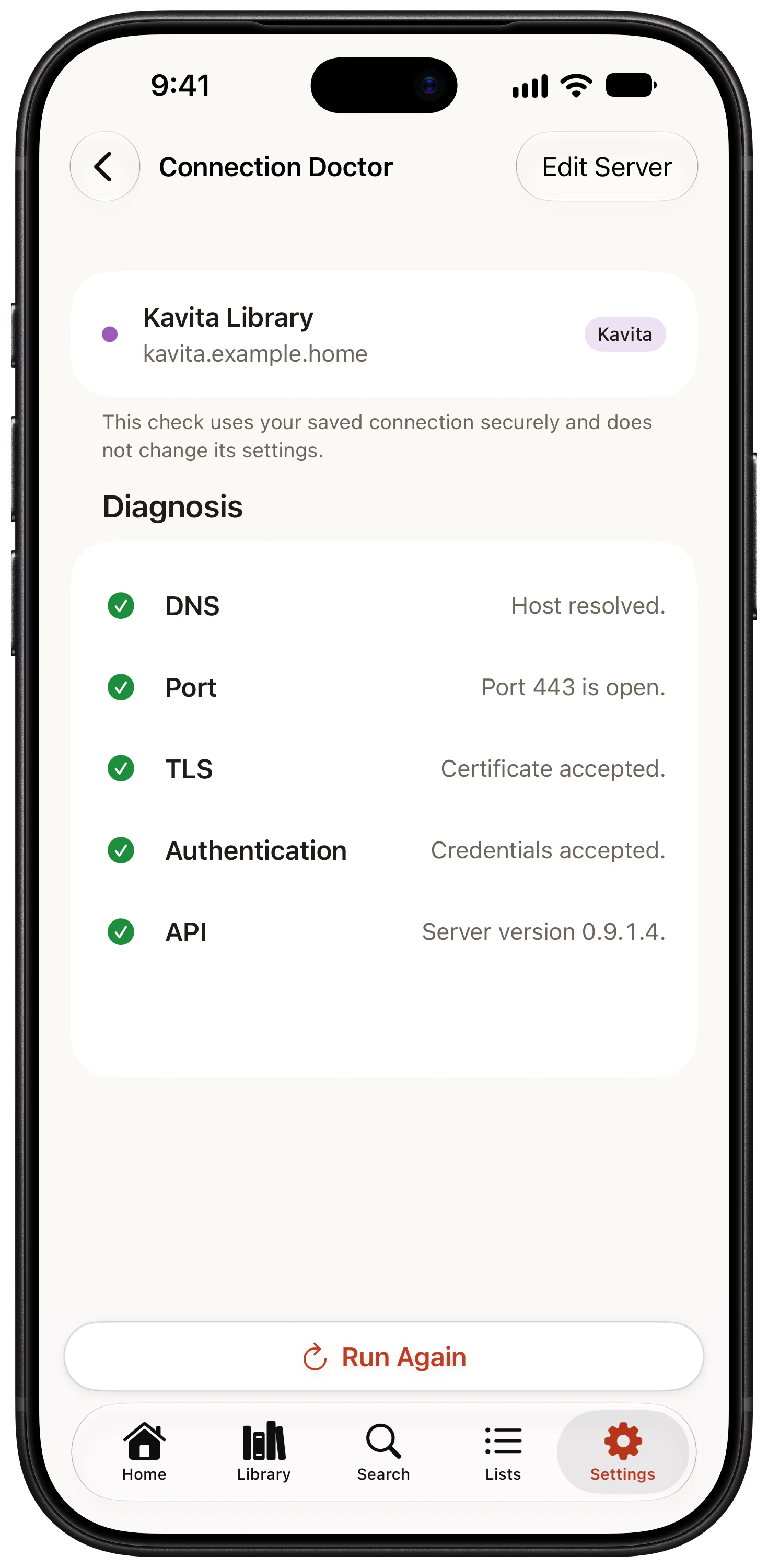
Self-hosting means certificates, proxies and ports. Connection Doctor walks a connection one stage at a time, stops at the first problem and names the next thing to check. It is free, from setup or any time in Settings.

Connection Doctor in Glimshelf after checking a Kavita library: DNS, Port, TLS, Authentication and API all passed, ending with the server version.

Connection Doctor in Glimshelf after checking a Kavita library: DNS, Port, TLS, Authentication and API all passed, ending with the server version.

Connection Doctor checks each stage, in order, with the saved connection.
  1. 1

    DNS

    Does the server's name resolve on this network?

  2. 2

    Port

    Is the server reachable through your proxy or tunnel?

  3. 3

    TLS

    Is the certificate valid for this address?

  4. 4

    Auth

    Are the saved credentials accepted?

  5. 5

    API

    Is this a supported server and version?

Library Health

Finds failed downloads, missing files and sync problems, and opens the screen that fixes each one.

Reading Continuity

Links the same book across sources once you review the match. When both editions have the same pages, Link & Sync Progress keeps your place in step.

New Release Alerts

Watches the series and lists you choose and lets you know on this device when something new arrives.

07Reading life

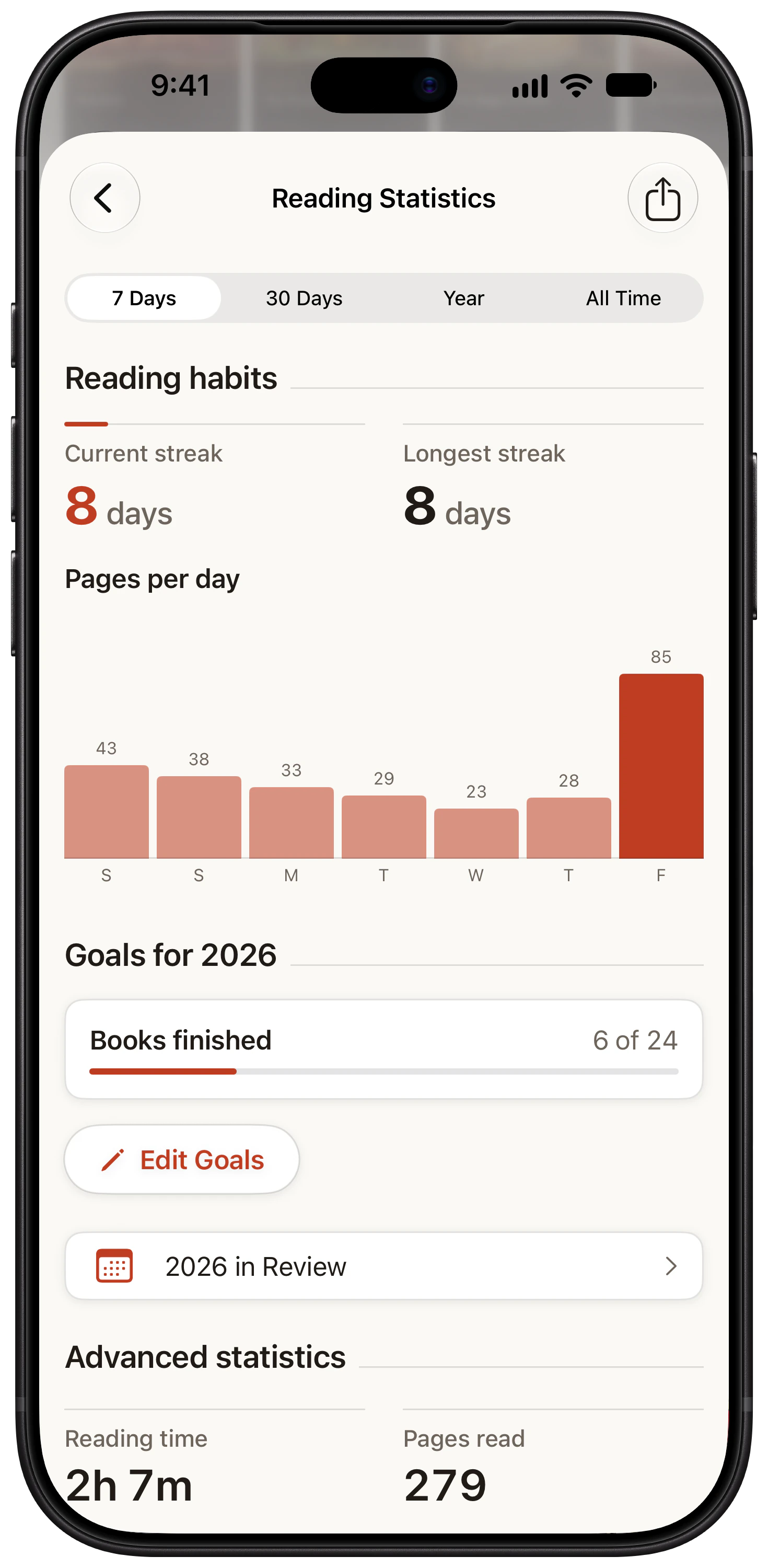
Free keeps your streak and pages per day. Pro adds reading time, sessions and pace, a yearly goal, and a Year in Review card you can share when you choose to.

Statistics stay on your devices and follow you through your private iCloud with Pro.

Reading Statistics in Glimshelf: an eight-day streak, a pages-per-day chart for the week, a 2026 goal of 24 books finished with 6 done, and reading time of 2 hours 7 minutes.

Reading Statistics in Glimshelf: an eight-day streak, a pages-per-day chart for the week, a 2026 goal of 24 books finished with 6 done, and reading time of 2 hours 7 minutes.

Streaks, pages per day and yearly goals.
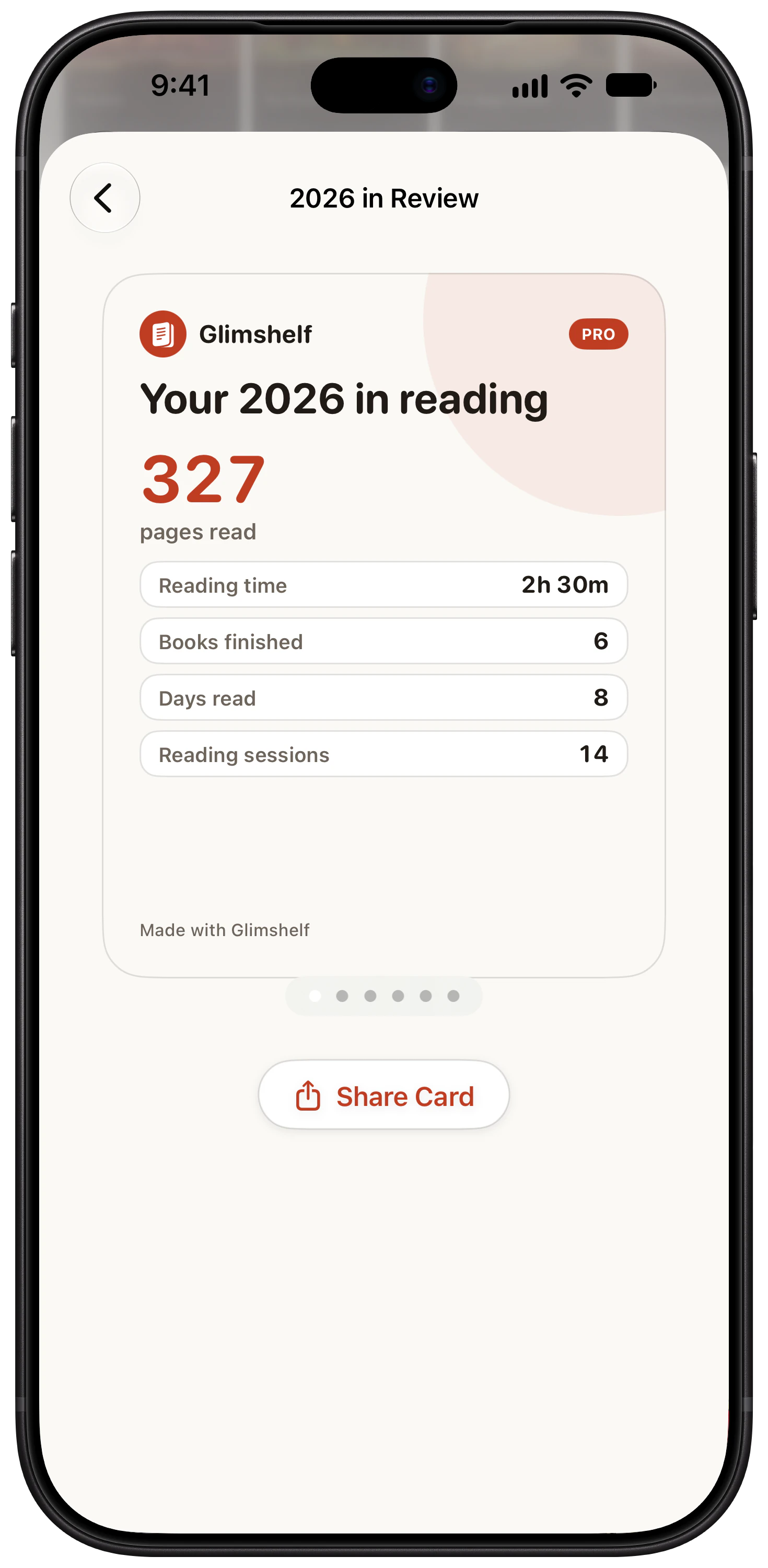
A 2026 in Review card from Glimshelf: 327 pages read, 2 hours 30 minutes of reading time, 6 books finished, 8 days read and 14 reading sessions, with a Share Card button.

A 2026 in Review card from Glimshelf: 327 pages read, 2 hours 30 minutes of reading time, 6 books finished, 8 days read and 14 reading sessions, with a Share Card button.

Year in Review gathers your reading into cards you can share when you want to.

08Glimshelf Pro

Pro is for readers with big libraries and particular habits. Everything here is included in Lifetime and Annual alike. Point at a tool to see its screen.
Ink
Ember
Paper
  • Bubble Zoom and Translate

    Step through speech balloons, then copy, speak or translate the recognized text on device.

  • Reading Orders and CBL

    Import and export Comic Book Lists, follow an order across series and resume at the next step.

  • Unlimited downloads

    Keep as many books offline as you like, and download the next issue automatically as you finish one.

  • Smart Collections

    Rule-based shelves that update themselves as your library changes.

  • Page Appearance

    Crop margins and restore faded or yellowed scans for a series or a single book.

  • Bookmarks and notes

    Save pages with notes, kept in sync through your private iCloud.

  • Reader profiles

    Separate progress, bookmarks and preferences for each reader, with its own accounts and its own optional Face ID or passcode lock.

  • AniList, MyAnimeList and Metron

    Track manga and western comics, issue by issue, with the services you already use.

  • Your Glimshelf

    Paper and Night reading backgrounds, alternate app icons and Rediscover shelves on Home.

  • Server tools

    Edit server metadata with the permissions you have, see Collection Gaps, and check the Server Dashboard.

Bubble Zoom in Glimshelf showing one speech balloon from Pepper and Carrot at a large, readable size, labelled Bubble 3 of 4, with Speak, Copy, Display, Previous and Next buttons.

Bubble Zoom and Translate

Privacy

Glimshelf connects directly to the servers, folders and optional services you choose. There is no Glimshelf account to create and no copy of your library on our side.

Read the privacy policy

  1. No ads, no third-party analytics.The app contains no advertising SDK and no third-party analytics SDK.
  2. No account with us.There is no developer-operated Glimshelf account or library relay.
  3. Passwords stay in Keychain.Server credentials and service tokens are stored in Apple's Keychain.
  4. Lock it if you like.Ask for Face ID, Touch ID or the passcode whenever Glimshelf opens. Free for everyone.
  5. Diagnostics only when you send them.A diagnostic report leaves your device only when you choose to share it.
  6. Your data can leave with you.Back up everything you created to one file and restore it anywhere, free.

Free & Pro

The reader is complete without paying: every server, every format, every reading mode and server progress sync. Pro adds tools for a bigger collection, as a one-time purchase that includes future versions.

Glimshelf Free

$0

A complete reader, with no time limit and no trial clock.

  • Unlimited servers and local files
  • Every format and reading mode
  • Progress sync, with a clear choice when pages differ
  • 5 downloaded server books at a time, Trip Packs included
  • Connection Doctor, Library Health and release alerts
  • Streaks, backup and a Face ID or passcode lock

Glimshelf Pro Lifetime

$24.99 once

Every Pro feature, now and in future versions. No subscription.

  • Unlimited downloads and automatic next-issue downloads
  • Reading Orders, CBL and Smart Collections
  • Bubble Zoom, Translate and Page Appearance
  • Bookmarks, notes and private iCloud sync
  • Reader profiles with AniList, MyAnimeList and Metron
  • Advanced statistics, goals and Year in Review

Family Sharing included. Buy it in the app from Settings.

Pro Annual

The same Pro features for people who prefer a smaller payment. Renews each year until you cancel. Family Sharing included.

$9.99 / year

21days free

Try Pro before you decide. Choose the trial in the app and confirm a zero-price App Store purchase. It never charges you and never renews. When it ends, the complete free reader stays, your library stays on your device, and up to 5 downloads stay readable offline. One trial per Apple Account.

Compare every Free and Pro feature

Free

Unified library and cross-server search
Library, Search and Home bring every connected source together
Basic statistics
Streaks and pages per day
Unlimited servers
Komga, Kavita and OPDS, with progress sync for Komga and Kavita
Unlimited local files
CBZ, CBR, CB7, PDF, and EPUB with no title cap
Every reader mode
Paged, Webtoon, and Double Page, left-to-right or right-to-left
Connection Doctor
DNS, Port, TLS, Authentication, and API checks, with the next action when a stage fails
Personal Home
Reading Now, Up Next, Continue Reading, and shelves you arrange
Offline reading
Up to 5 downloaded server books at once, including books in Trip Packs; local files do not count
Storage controls
A storage dashboard, keep rules for each series, and Free Up to clear space
Reading Continuity
Review possible same-work editions before linking anything across sources
Library Health and release alerts
Actionable issues, plus New Release Alerts for the series you watch
Kavita Want to Read
Add or remove a series from its toolbar; it stays in step with your Kavita account
Profile protection
Face ID, Touch ID, or the passcode whenever Glimshelf opens or you return to it
Portable backup
Export everything you authored to one file; import is merge-only

Pro

Page Appearance
Crop margins and improve faded or yellowed scans per series or book
More library tools
Rediscover, Metron-linked Collection Gaps and the Server Dashboard
Personal appearance
Paper and Night reader backgrounds and alternate app icons
Reading Orders and CBL
Cross-series sequences, community imports, and unmatched-title review
Unlimited downloads
No limit on downloaded server books, plus automatic next-issue downloads
Bookmarks and notes
Private iCloud sync with best-effort Kavita bookmark mirroring
Server metadata editing
Permission-aware edits, locks, and poster uploads
Bubble Zoom
Step between speech balloons at readable size; Copy, Speak and on-device Translate work on the recognized text
Smart Collections
Rule-based shelves that update as the library changes
Tracking and metadata services
AniList, MyAnimeList, and Metron
Reader profiles
Separate progress, bookmarks, and preferences; each profile can use its own server or tracker account and its own Face ID, Touch ID, or passcode lock
Private iCloud sync
Home layout, reader preferences, Smart Collections, Reading Orders, and local-file progress follow you across devices
Advanced statistics
Calendar-year statistics, yearly goals, reading time, sessions, pace and a shareable Year in Review

US prices. The App Store shows the price in your currency. Pro Annual renews automatically unless you cancel at least 24 hours before the end of the current subscription year; manage it in your Apple Account subscription settings. Purchases are covered by Apple's standard license terms and our privacy policy.

Questions

More detail is in the guide and on the compatibility page.

Do I need a server to use Glimshelf?

No. Add a folder of CBZ, CBR, CB7, PDF or EPUB files from the Files app and read them right away. A server is only needed if your library lives in Komga, Kavita or an OPDS catalog.

Which servers and versions work?

Komga 1.20 or later, Kavita 0.9.0.2 or later, and OPDS catalogs. Enter the address that opens your server, including http:// or https:// and any path prefix, and Connection Doctor checks it before the first sync.

Is progress sync free?

Yes. Reading progress syncs with Komga and Kavita on Free, with no server or library-size limit. If this device and your server both moved to different pages since the last sync, Glimshelf shows both and lets you choose. Syncing progress for local files through your private iCloud is part of Pro.

What does the free download limit count?

Free keeps up to 5 server books downloaded at a time, including books in Trip Packs. Local files never count, and other server books still stream when you are online. Pro removes the limit.

Is Pro a subscription?

It doesn't have to be. Pro Lifetime is $24.99 once and includes future versions. Pro Annual is an optional $9.99 yearly subscription with the same features, for people who prefer a smaller payment. Both support Family Sharing.

How does the free trial work?

Choose the 21-day trial in the app and confirm a zero-price App Store purchase. It never charges you and never renews. When it ends, Pro features stop and the complete free reader stays. Everything you saved stays on your device, and up to 5 downloads remain readable offline on Free. The trial is available once per Apple Account.

Does Glimshelf sell comics?

No. Glimshelf reads books you own or have permission to access. It doesn't sell books or offer a subscription catalog, and files must be DRM-free. One free Pepper & Carrot episode is included so you can try the reader before connecting anything.

What information leaves my device?

The app talks directly to the servers, folders and optional services you choose, such as AniList, MyAnimeList, Metron or your private iCloud. There is no Glimshelf account, no advertising or third-party analytics SDK, and diagnostics are only sent when you share them.

Is Glimshelf available in Japanese?

Yes. The interface is available in English and Japanese. Vertical Japanese EPUB text is not supported yet, and Bubble Zoom's text recognition works best with horizontal lettering.
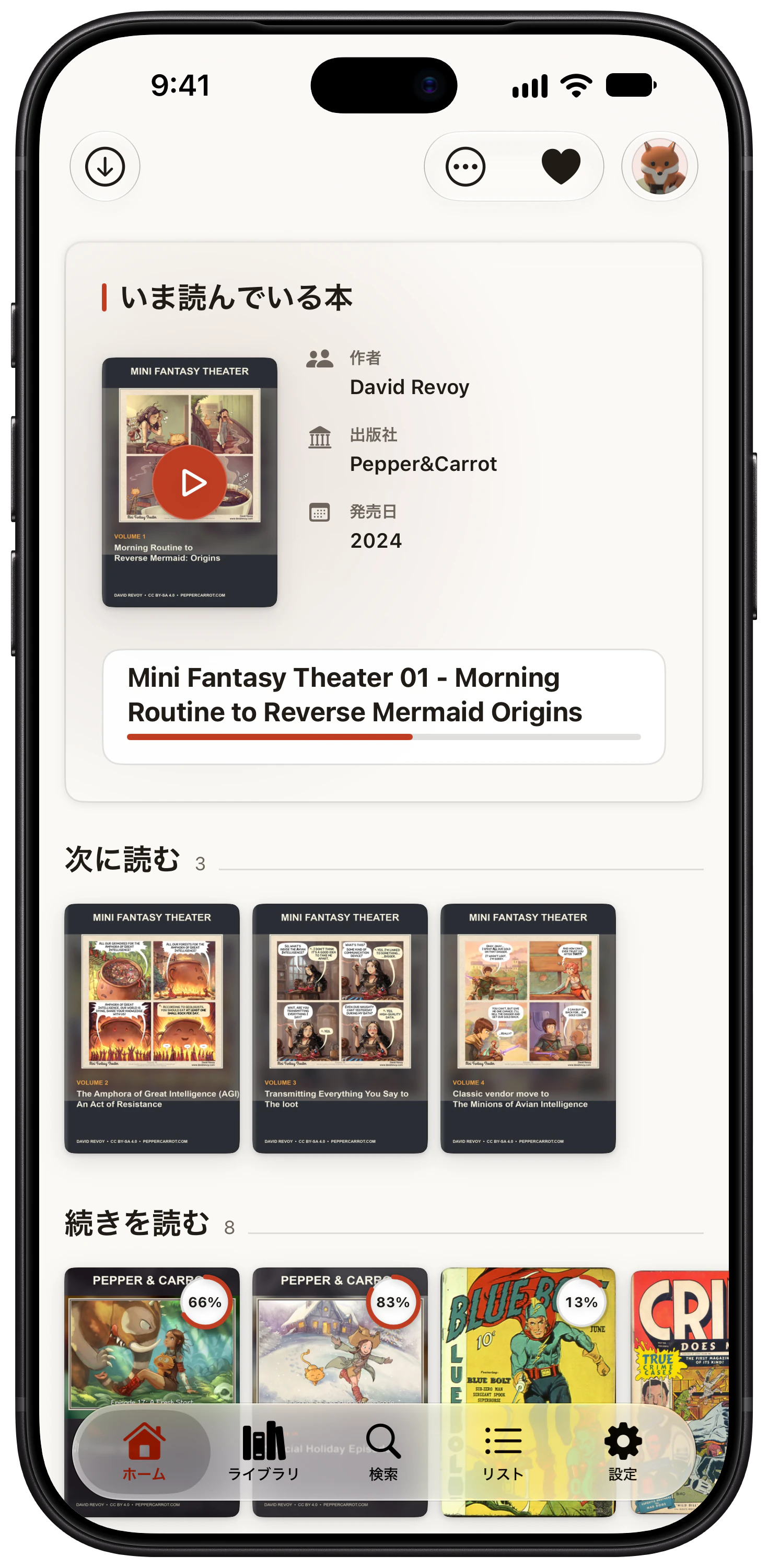
Glimshelf Home in Japanese, showing いま読んでいる本 (Reading Now) with Mini Fantasy Theater, 次に読む (Up Next) and 続きを読む (Continue Reading).

Glimshelf Home in Japanese, showing いま読んでいる本 (Reading Now) with Mini Fantasy Theater, 次に読む (Up Next) and 続きを読む (Continue Reading).

The interface is also available in Japanese.Art: Mini Fantasy Theater by David Revoy, CC BY-SA 4.0 · Pepper & Carrot by David Revoy, CC BY 4.0
Which devices are supported?

iPhone, including iPhone Duo, and iPad with iOS or iPadOS 18 or later. On iPad and on an open iPhone Duo, landscape double-page spreads and a wider Home make use of the larger screen.

Does Glimshelf work on iPhone Duo?

Yes, from version 1.0.1. Closed, the outer display shows one page. Open and held wide, the inner display shows a two-page spread with its spine on the fold. Folding or unfolding mid-book keeps your place.

Glimshelf grew through a public beta, and the readers who tested it shaped 1.0. Talk with other readers and the developer, follow what changes, and ask for help when you need it.

A short note when Glimshelf changes.

New versions, new features and the occasional offer, a few times a year. No account needed, and you can stop at any time.

Ask to be removed at any time at contact@glimshelf.com. How we use your address.

Free to download and read. Pro is $24.99 once, with a 21-day free trial.

Covers: Pepper & Carrot art by David Revoy, CC BY 4.0, with cover lettering added for this illustration. Blue Bolt, Planet Comics, Rangers Comics and Strange Worlds are in the public domain.